Categories
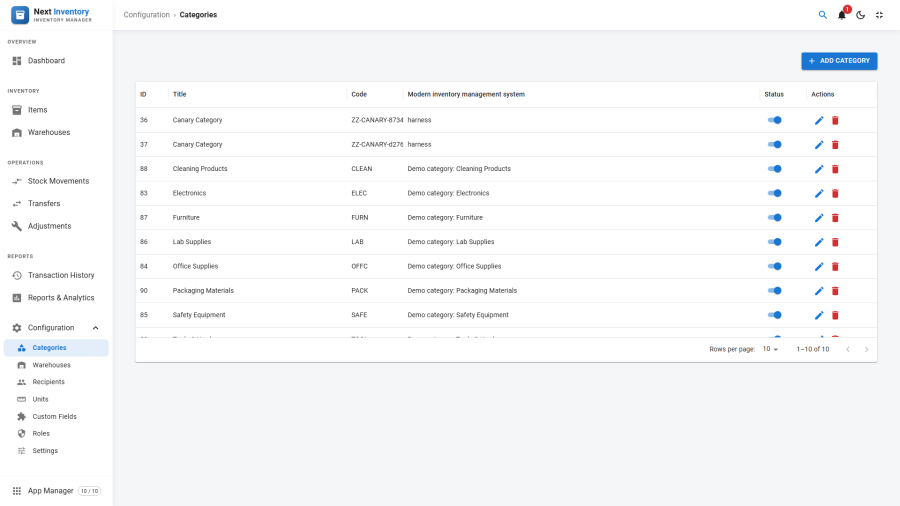
Categories group items for filtering, reporting, and catalog navigation. Every item belongs to exactly one category — it's a required field on the item form. Categories are the organising backbone of your inventory, so getting the list right on day one pays off every day afterwards.
Open it from Components > Next Inventory > Configuration > Categories, or the Categories link in the Configuration sidebar in fullscreen mode.
For Users
If you're not setting Next Inventory up yourself, you'll rarely need this screen directly. What to know:
- Items are filtered and reported by category — on the Items list, the Reports tab, and the dashboard charts, category is a first-class dimension.
- Unpublished categories hide from item forms — if you can't find a category in the dropdown when editing an item, it's been unpublished by an admin.
- Renaming a category is safe — existing items re-label immediately; no items move.
For Admins
Creating a Category
- Click New on the Categories list.
- Enter a Title — this is what users see in dropdowns and reports. Keep it short and recognisable.
- Optionally add a Code — a short unique identifier for your
own referencing (e.g.
IT-LAPTOP,CLEAN-CONSUM). The code isn't shown to everyday users, but it gives you an unambiguous label for exports and cross-referencing. - Optionally add a Description — free text.
- Pick Status: Published / Unpublished / Trashed.
- Save.
Category Planning Guidance
A few rules of thumb that save grief later:
- 5–15 top-level categories is the sweet spot. Fewer and everything looks the same; more and you spend time scrolling dropdowns. If you catch yourself writing a spreadsheet of categories, prune until it fits on a sticky note.
- Organise by what the item is, not who uses it. "Laptops" scales, "Marketing Laptops" doesn't — the moment Marketing lends one to Sales, your category is wrong.
- Avoid overlap. Each item should have one obviously-correct category. If "Monitor" and "IT Equipment" both look right, collapse them into one.
- Seed the list before adding items. You can add categories later, but bulk-reassigning items is tedious. Draft the taxonomy before importing inventory.
Renaming and Unpublishing
- Rename — changes the title instantly everywhere. No cascade needed.
- Unpublish — items still point to the category, reports still group by it, but it disappears from new-item dropdowns. Use unpublish when retiring a category gracefully.
- Trash — same as unpublish for display purposes; flagged for cleanup. The Joomla pattern is "trash, then delete" — trashed categories stay until you purge them explicitly.
- Delete — requires the category to have no items pointing at it. Deleting a category that still has items is blocked with a friendly error listing the affected items.
Permissions
| Action | Feature | Permission |
|---|---|---|
| See the Categories list | categories |
view |
| Create a category | categories |
create |
| Edit a category | categories |
edit |
| Delete a category | categories |
delete |
Categories have a narrower permission set than items because they're
configuration, not inventory. Most roles want view so users can see
existing categories; create and edit are admin-level.
Edge Cases
- Deleting a category referenced by items is blocked with an error. To remove a category with items, move the items to another category first (bulk-edit via the Items list).
- Duplicate titles allowed but confusing. The form doesn't enforce uniqueness on title. Use the Code field if you need a unique identifier.
- Sub-categories — the current release uses a flat category list; there is no nested picker. If you need sub-categories, put them in the description or title (e.g. "IT > Laptops") until a nested picker arrives.
- Ordering — there is no manual ordering control in the current release. Categories appear alphabetically sorted in dropdowns and the list view.
Form Reference
| Field | Required | What it's for |
|---|---|---|
| Title | Yes | The name users see in dropdowns and reports |
| Code | No | A short unique identifier for your own referencing |
| Description | No | Free-text notes about the category |
| Status | Yes | Published / Unpublished / Trashed |