Units of Measurement
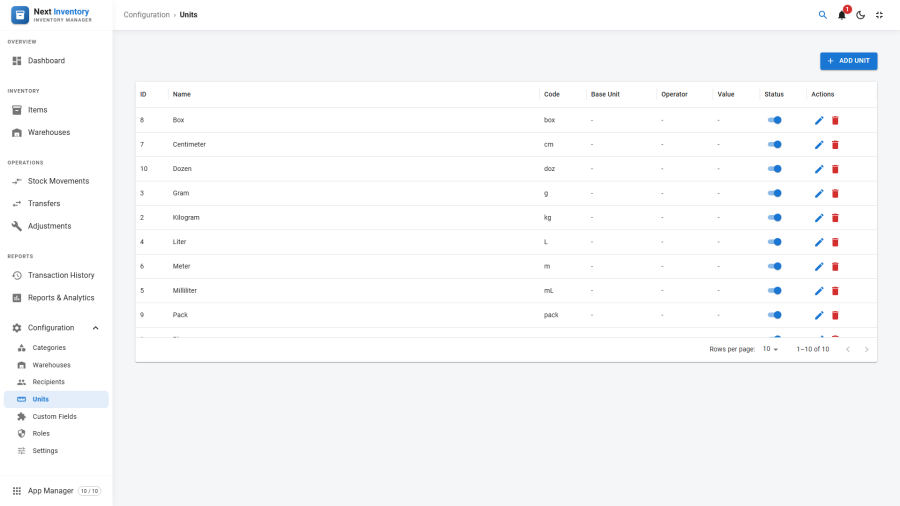
Units is Next Inventory's unit-of-measurement system — define the units your inventory is measured in (pieces, kg, litres, boxes, metres), chain them together with conversion formulas, and let the system convert quantities automatically when you record transactions in whatever unit is convenient.
Open it from Components > Next Inventory > Configuration > Units.
For Users
Most of the time you won't notice units exist. When you edit an item you pick its unit once, and every transaction uses that unit by default. You only encounter the unit system directly when:
- Recording a transaction in a different unit — the line-item picker lets you override the unit (e.g. record an add-stock in "boxes of 12" when the item's native unit is "pieces"). The conversion happens on save.
- Comparing quantities on reports that aggregate items with different units — the report uses each item's unit, not a normalised one. Use categories to segment like-with-like.
For Admins
Creating a Unit
- Click New on the Units list.
- Enter a Title ("Kilogram") and a Code ("kg"). Codes are short display labels used wherever the unit is referenced; titles are the verbose form shown in dropdowns.
- If this is a derived unit (not a base unit), pick a Base Unit
from the dropdown, then fill in:
- Operator —
*,/,+, or- - Operation Value — the numeric factor
- Operator —
- Leave Base Unit blank if this is a base unit (has no conversion).
- Pick Status: Published / Unpublished.
- Save.
Conversion Chains
A unit can derive from another unit, which can itself derive from another — that's the chain. On every conversion, Next Inventory walks the chain to the root base unit, applies each step in order, then walks back down to the target unit if needed.
Worked example:
| Unit | Base unit | Operator | Value | Conversion |
|---|---|---|---|---|
mm |
— | — | — | base |
cm |
mm |
* |
10 | 1 cm = 10 mm |
m |
cm |
* |
100 | 1 m = 100 cm = 1000 mm |
km |
m |
* |
1000 | 1 km = 1000 m |
Recording an add-stock of 0.5 km on an item whose unit is cm:
- Convert to base:
0.5 × 1000 × 100 = 50000 mm - Convert from base to item unit:
50000 / 10 = 5000 cm - Stock quantity updates by
+5000.
Division and subtraction chains work the same way in reverse.
Circular Reference Protection
Chains must not loop back on themselves: if cm derives from m
and m derives from cm, conversion would never end. Saving a
unit that would create a loop is blocked — you'll see an error
message on save, and the invalid chain is never stored.
Compatible Units
Units that share the same root base unit are compatible with each other. Only compatible units are offered when picking a transaction unit — you can't record a kg quantity on an item measured in metres.
Planning Your Unit List
Sensible defaults for most small operations:
- pieces (base) — for discrete items
- box — derived from pieces (e.g.
* 12) - pallet — derived from box (e.g.
* 40) - kg (base) — for weighted items
- g — derived from kg (
/ 1000) - tonne — derived from kg (
* 1000) - litre (base) — for fluids
- ml — derived from litre (
/ 1000)
If you're doing industrial metric + imperial, add inch / foot / yard chains. Keep the base-unit count low (one per physical dimension): more chains is fine, more base units is a sign that the taxonomy is too fragmented.
Permissions
| Action | Feature | Permission |
|---|---|---|
| See the Units list | configuration |
manage_units |
| Create or edit a unit | configuration |
manage_units |
| Delete a unit | configuration |
manage_units |
| Pick a unit on an item or transaction | inherits item / transaction permissions | — |
Edge Cases
- Changing the unit on an item with history — historical transactions keep the unit they were recorded in; they don't retro-convert. Be careful: switching an item from "pieces" to "boxes" without translating past transactions will show wrong historical numbers if you conflate them.
- Decimal precision in conversion chains — the Operation Value field accepts up to 6 decimal places. For more exotic chains (imperial units), pick a base unit that keeps the conversion factors simple enough to fit that precision.
- Deleting a base unit with dependents — blocked until all derived units are deleted or reassigned to a different base.
- A unit's operator is blank — the conversion is skipped. Useful for "alias" units that are just another name for the base without any math (rare but possible).
- Operators
+and-exist but are rarely useful for real units. They're there for edge cases like temperature scales (Celsius / Fahrenheit), but for inventory work you'll almost always use*or/.
Form Reference
| Field | Required | What it's for |
|---|---|---|
| Title | Yes | The verbose display name shown in dropdowns |
| Code | Yes | The short label used wherever the unit appears |
| Base Unit | No | The unit this one converts to (blank = base unit) |
| Operator | If Base Unit is set | The conversion operation: *, /, +, or - |
| Operation Value | If Base Unit is set | The numeric conversion factor (up to 6 decimals) |
| Status | Yes | Published / Unpublished |