Next Boards
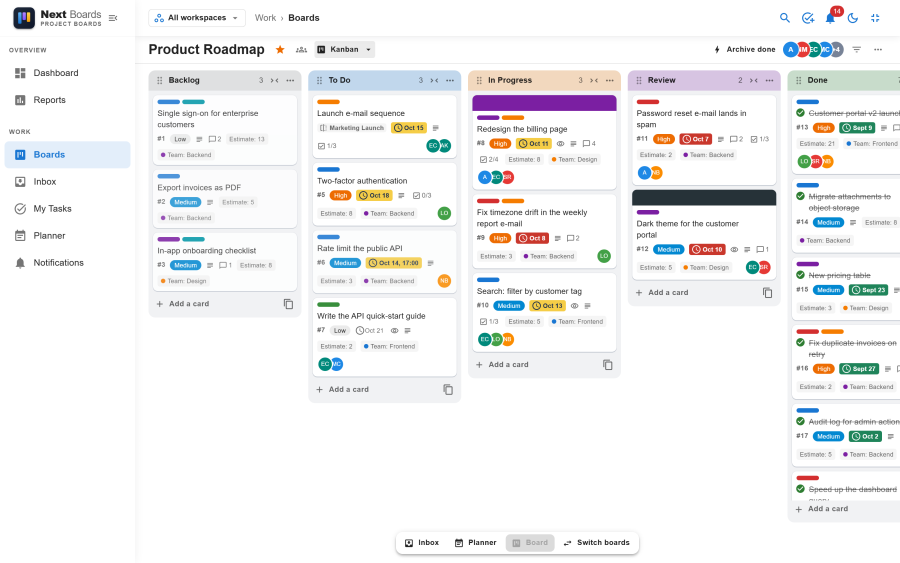
Next Boards is a Kanban project and task board for Joomla, in the style of Trello. It runs on Joomla 4.4, 5 and 6. Teams plan work on boards of lists and cards, inside the Joomla site they already have, with the user accounts they already have.
What It Does
You create a board for a project, split it into stages such as To Do, In Progress and Done, and add a card for each piece of work. Cards move from stage to stage as the work advances. A card holds everything about its task: a description, people, dates, labels, checklists, files, comments and its full history.
The same board can be read as a Kanban board, a sortable list, a calendar or a roadmap timeline. Around the boards, each person has a private Inbox for quick notes, a Planner for their week, and a My Tasks page with everything assigned to them. Routine steps can be automated with rules and buttons.
Next Boards runs in the Joomla administrator and on the public side of your site, and opens as a dedicated app on phones. Your data stays in your own Joomla database.
Key Features
- Boards and templates: unlimited boards from six templates, with stars, backgrounds, duplicate, archive and restore. See Boards.
- Workspaces: group boards by team or client, with private, workspace and public visibility. See Workspaces.
- Kanban board: drag-and-drop cards and stages, WIP limits, filters and a board activity log. See The Kanban board.
- Cards: Markdown descriptions, several assignees, due dates with reminders, checklists with their own assignees, attachments, comments with @mentions and reactions, templates and mirrors. See Cards.
- Custom fields: text, number, date, checkbox and dropdown fields per board. See Custom fields.
- Four views: Kanban, List with bulk actions, Calendar and Roadmap. See List, Calendar and Roadmap views.
- Inbox: a private capture list, also fed by e-mail. See Inbox.
- Planner: drag cards onto your own day and week. See Planner.
- My Tasks and calendar feed: your work across all boards, also in Google Calendar, Outlook or Apple Calendar. See My Tasks.
- Automation: rules, card and board buttons, scheduled commands. See Automation.
- Notifications: in the app and by e-mail, instantly or as a daily digest. See Notifications and e-mail.
- Dashboard and reports: throughput, workload and due-date figures. See Dashboard and reports.
- Phone app, offline use: a touch layout for phones, and an installable app that keeps working without a connection. See Phone app.
- Permissions: board roles, workspace roles and site-wide roles for users or Joomla groups. See Access and permissions.
Requirements
| Requirement | Value |
|---|---|
| Joomla | 4.4, 5.x or 6.x |
| PHP | 8.1 or newer |
| Database | MySQL or MariaDB, in a version your Joomla release supports. PostgreSQL is not supported. |
| HTTPS | Recommended; required for the installable app and offline use |
PHP imap extension |
Only for E-mail to Inbox |
| Browser | A current version of Chrome, Edge, Firefox or Safari |
What's Included
One package, pkg_nextboards, installs:
- Next Boards (component): the application, in the administrator and on the site.
- Task - Next Boards (plugin): sends e-mails and reminders, runs scheduled automations, reads the Inbox mailbox.
- System - Next Boards Session (plugin): lets you sign in again in place when a session expires.
- Installer - Next Boards Update Helper (plugin): lets Joomla download updates for your licence.
Where to Start
- Installation
- Quick Start: your first board in a few minutes
- Features: everything Next Boards does, with a guide for each part
Support
- Website: https://nextsoftware.dev/
- Email: [email protected]
- License: GNU General Public License version 2 or later