Scheduled tasks
Some of what Next Boards does happens in the background: sending e-mails, reminding people of due dates, running scheduled automations, reading the Inbox mailbox. This work is done by Joomla's own Scheduled Tasks, through the "Task - Next Boards" plugin that comes with the package.
If notification e-mails or reminders never arrive, the cause is nearly always here.
The tasks
Open System → Scheduled Tasks in the Joomla administrator.
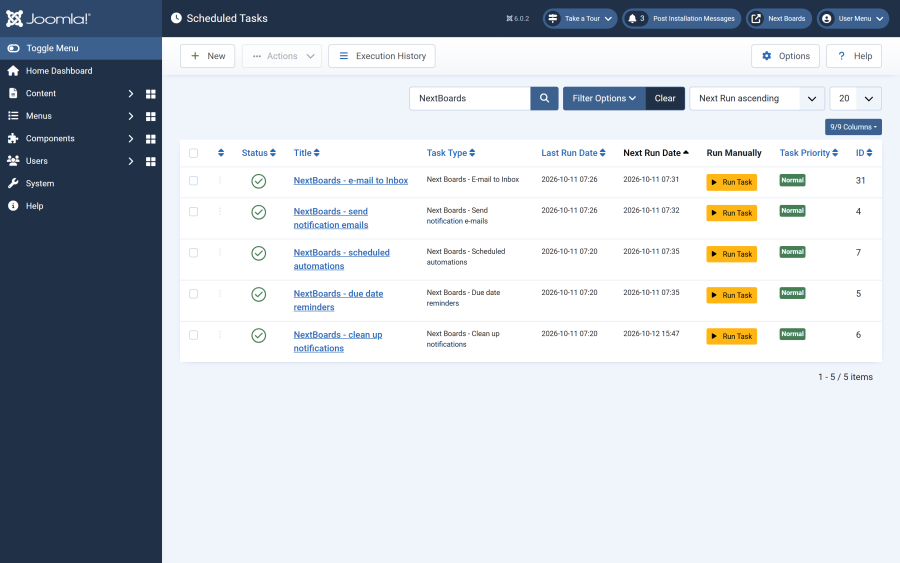
| Task | Runs | Does |
|---|---|---|
| NextBoards - send notification emails | Every 5 minutes | Sends the queued notification e-mails. People who chose a daily digest get one e-mail a day, after 08:00 in their time zone. |
| NextBoards - due date reminders | Every 15 minutes | Notifies the assignees and watchers of open cards when a due date is near and when it has passed. |
| NextBoards - scheduled automations | Every 15 minutes | Runs the scheduled commands of board automations when they are due. |
| NextBoards - clean up notifications | Daily | Deletes read notifications, finished e-mail queue entries and old automation log entries. |
| NextBoards - e-mail to Inbox | Every 5 minutes | Reads the Inbox mailbox. Created when E-mail to Inbox is switched on. |
| NextBoards - reset demo data | Hourly | Re-seeds the demo data. Created only when the automatic demo reset is switched on. |
The first four are created by the installer, under these titles. If one is missing, click New in the Scheduled Tasks list and pick its type; the types are listed as "Next Boards - Send notification e-mails", "Next Boards - Due date reminders" and so on. You can give a task any title.
Making sure the scheduler runs
Creating the tasks is not enough: something has to trigger Joomla's scheduler. There are two ways, set under System → Scheduled Tasks → Options.
| Method | How it works | Good for |
|---|---|---|
| Lazy scheduler | Visits to the site trigger the tasks. On by default in Joomla. | Sites with steady traffic. On a quiet site, tasks run late or not at all at night. |
| Web cron or a server cron job | The server calls the scheduler on a timer, visitors or not. | Reliable timing. Recommended. |
A server cron job that runs every minute looks like this:
* * * * * php /path/to/your/site/cli/joomla.php scheduler:runUse the PHP binary your site runs on (8.1 or newer), and the real path to your site.
Checking that it works
- In the Scheduled Tasks list, the Last run column of each Next Boards task should show a recent time.
- In Next Boards, Configuration → Settings → Notifications & Email lists the tasks with their state: enabled or disabled, last run, and whether the last run failed.
- To run a task at once, select it in the Scheduled Tasks list and use Joomla's Run Test button.
Options of the tasks
Open a task to change its frequency or its options.
| Task | Option | Meaning |
|---|---|---|
| Send notification e-mails | Batch size | The most e-mails sent in one run. |
| Send notification e-mails | Site URL | The address links in e-mails start with, for example https://example.com/. Leave empty to use Joomla's Live Site setting, or the site's own address when the task runs from the web. Set it when the task runs from a server cron job and the links in e-mails are wrong. |
| Send notification e-mails | Site menu item ID | The menu item that opens Next Boards on the site, for recipients who cannot sign in to the administrator. Leave empty to find it automatically. |
| Due date reminders | Batch size | The most cards checked in one run. |
| Clean up notifications | Keep for (days) | Read notifications and finished e-mail entries older than this are deleted. |
The plugins
The package installs three plugins and enables them. All three should stay enabled.
| Plugin | Purpose |
|---|---|
| Task - Next Boards | Provides the tasks above. Disabled: nothing runs. |
| System - Next Boards Session | Lets the app ask you to sign in again in place when your session has expired, without losing the page you are on. |
| Installer - Next Boards Update Helper | Identifies your site to nextsoftware.dev when Joomla downloads an update. Disabled: updates are listed but cannot be downloaded, and Next Boards shows a warning. |