E-mail to Inbox setup
E-mail to Inbox lets every user forward a message to a private address and find it as a card in their Inbox a few minutes later. This page is for the site administrator who connects the mailbox. What users see is described on the Inbox page.
Only Super Users can open these settings, because they hold the mailbox password and make the server connect to a mail server of your choosing.
How it works
You connect one mailbox for the whole site, for example [email protected]. Each user gets their own address on it, made of the mailbox name, a +, and a private code:
[email protected]Mail servers deliver such "plus addresses" to the plain mailbox. Every few minutes Next Boards reads the new messages, looks at the code to find out whose Inbox each one is for, and creates the cards.
What you need
| Requirement | Notes |
|---|---|
| A mailbox used for nothing else | Every message in it is processed. Do not use a mailbox people read. |
| Plus addressing | The provider must deliver name+anything@domain to name@domain. Gmail, Google Workspace, Microsoft 365, Fastmail and most hosting providers do. Send a test message to name+test@… to check. |
| IMAP or POP3 access | With a user name and password. For providers that require it, use an app password. |
PHP's imap extension |
On the web server. The settings page says so when it is missing; ask your host to enable it. |
| Joomla's Scheduled Tasks running | See Scheduled tasks. |
Connecting the mailbox
Open Configuration → Settings → E-mail to Inbox.
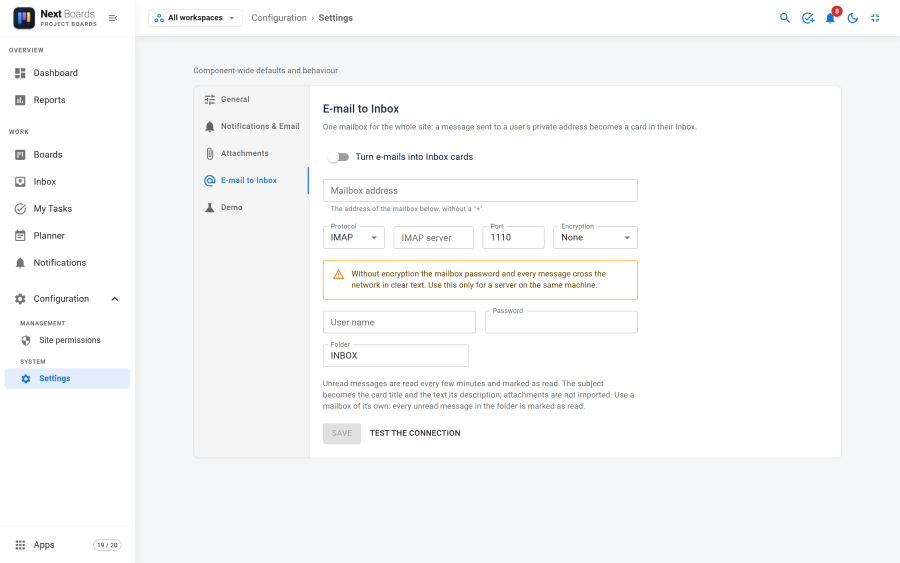
| Field | What to enter |
|---|---|
| Turn e-mails into Inbox cards | The switch for the whole feature. |
| Mailbox address | The address of the mailbox, without a +. |
| Protocol | IMAP (recommended) or POP3. |
| Mail server | For example imap.example.com. |
| Port | 993 for IMAP over SSL, 995 for POP3 over SSL. |
| Encryption | SSL, TLS or None. |
| User name, Password | The mailbox login. |
| Folder | IMAP only. INBOX unless your mailbox files the messages elsewhere. |
- Fill in the fields and click Save.
- Click Test the connection. It signs in to the mailbox and reports the result without reading any message.
- Switch Turn e-mails into Inbox cards on and save.
Switching the feature on creates the scheduled task NextBoards - e-mail to Inbox, which runs every 5 minutes. From then on each user finds an E-mail to Inbox button on their Inbox page.
IMAP or POP3
| IMAP | POP3 | |
|---|---|---|
| Which messages are read | The unread ones | All of them |
| After reading | Marked as read; they stay in the mailbox | Deleted from the mailbox |
| A message that could not be turned into a card | Marked as read and flagged, so you can find it | Left in the mailbox and tried again on the next run |
Choose IMAP when you can. POP3 has no way to mark a message as read, so the only way not to read it twice is to delete it.
With IMAP, do not open the mailbox in a mail program: a message you open there is marked as read and Next Boards will not import it.
The password
- The password is stored encrypted, with a key derived from your site's secret (the
secretinconfiguration.php). - It is never shown again and never sent back to the browser. To keep the stored password, leave the field empty when you save.
- If you change the server, port, protocol, encryption or user name, the stored password is forgotten and you must type it again. This prevents a changed server address from receiving the old password.
- If the site's secret changes, for example after moving the site with a new configuration file, type the password again.
Avoid None as encryption: the password and every message would cross the network unprotected. It is meant for a mail server on the same machine.
Limits and safeguards
| Rule | Value |
|---|---|
| Messages read per run | 50 |
| A run stops taking new messages after | 25 seconds; the next run carries on |
| Users one message can be filed for | 5 |
| Attachments taken from one message | 10, each under the upload rules (size, type, board storage) |
| Cards a user can receive by e-mail | 200 in 24 hours |
| The same message for the same user | Filed once |
- Only the recipient fields of a message are searched for codes. A code written in the text of a message does nothing.
- A message for nobody (no valid code) is ignored and, over IMAP, marked as read.
- A blocked Joomla user receives nothing.
- A problem with one message never stops the others; it is written to Joomla's log.
- While the Attachments app is off, attachments are not imported.
Switching it off
Switch Turn e-mails into Inbox cards off and save. The addresses stop working; the cards already created stay. The users' codes are kept, so switching it on again gives everyone the same address as before.