My Tasks and the calendar feed
My Tasks is one page with your work from every board: the cards assigned to you, grouped by when they are due. Open it from Work → My Tasks.
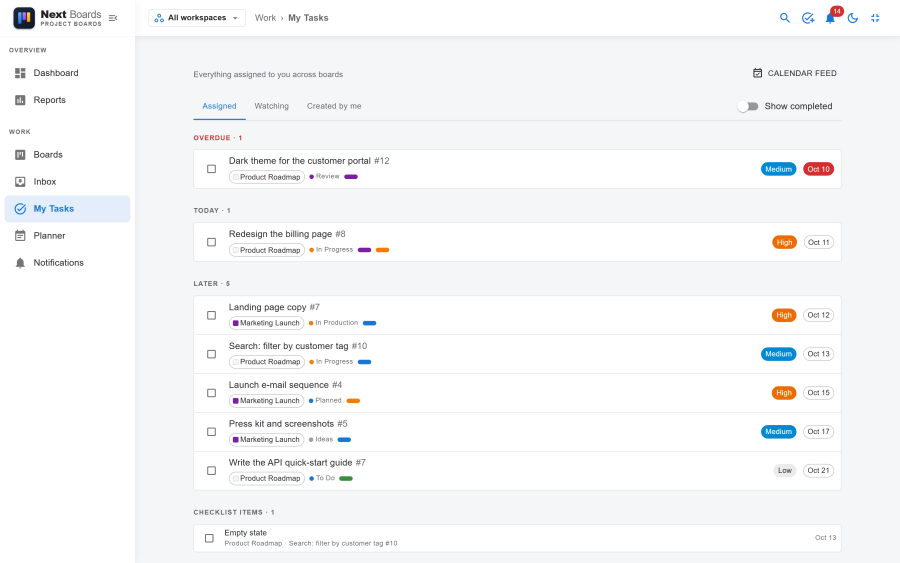
What the page shows
Three tabs choose which cards you see:
| Tab | Cards |
|---|---|
| Assigned | Open cards you are assigned to. Checklist items assigned to you are listed here too, under Checklist items. |
| Watching | Open cards you watch. |
| Created by me | Open cards you created. |
Inside a tab the cards are grouped by due date: Overdue, Today, This week, Later and No due date. "Today" is the day in your own time zone.
Each row shows the card's board, its labels and its due date.
- Tick the circle on a row to mark the card done without opening it.
- Click a row to open the card on its board.
- Show completed adds the cards you finished.
The page follows the workspace switcher in the header: choose one workspace to see only its cards.
Only boards you can still see are included. If you are removed from a board, its cards leave your list.
Calendar feed
The calendar feed puts your due dates into the calendar you already use. It is a private address that Google Calendar, Outlook, Apple Calendar and any other application that reads the iCalendar format can subscribe to.
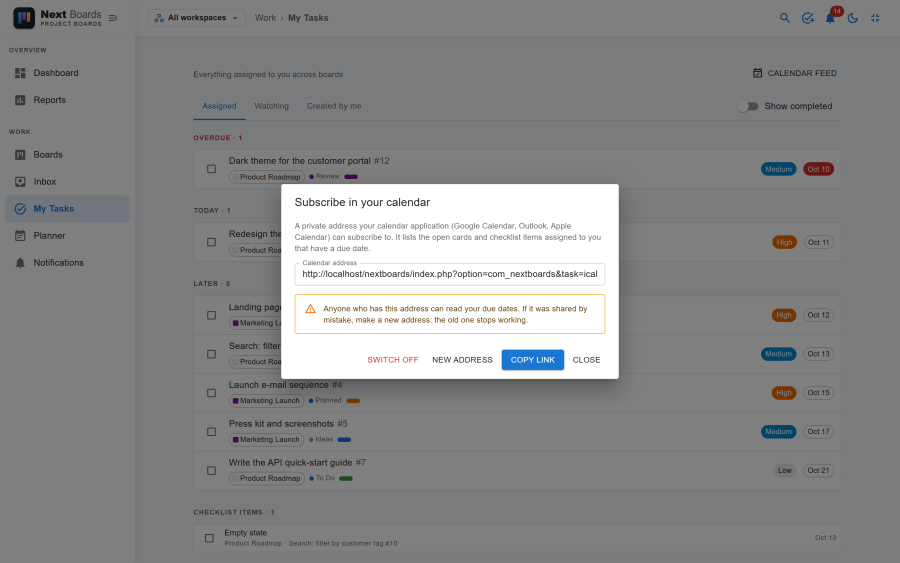
Switching it on
- On My Tasks, click Calendar feed.
- Click Switch on. Your Calendar address appears.
- Copy the address and add it to your calendar as a subscription:
- Google Calendar: Other calendars → + → From URL.
- Outlook: Add calendar → Subscribe from web.
- Apple Calendar: File → New Calendar Subscription.
Subscribe to the address. Do not download the file and import it: an imported file is a one-off copy that never updates.
What is in the feed
| Item | Shown as |
|---|---|
| An open card assigned to you with a due date and no time | An all-day event on that day |
| An open card assigned to you with a due time | A 30-minute event at that time |
| An open checklist item assigned to you with a due date | An all-day event on that day |
Completed and archived cards drop out. Cards on boards you can no longer see are not included.
Calendar applications fetch subscribed calendars on their own schedule, often only every few hours, so a new due date can take a while to appear.
Keeping the address private
Anyone who has the address can read your due dates, without signing in. If it was shared by mistake, click New address: the old one stops working at once and you subscribe again with the new one. Switch off closes the feed altogether.
Switching My Tasks off
My Tasks is an app. With it switched off under Configuration → Apps, the page and the calendar feed disappear. The assignments stay on the cards.
See also
- Planner: decide when you will do the work
- Notifications: reminders before a card is due
- Time zones