Features
Everything Next Task does, by theme. Each section links to the page that explains it in full.
Task Management
The everyday surface: lists, tasks, subtasks and the order you keep them in.
- Multiple task lists Every user owns private lists; create, rename, colour, reorder by drag and delete them, with live open-task counts in the lists panel.
- Default list Every user starts with a "My Tasks" list, created on their first visit. The default list can be renamed but not deleted; make another list the default first (from the list's menu, or in Settings) if you want to remove it.
- Subtasks, one level deep Make a task a subtask of the one above (the row menu, or drag) and check subtasks off individually.
- Manual ordering The default "My order" mode uses fractional positions, so dragging one task rewrites a single row and never reshuffles the rest.
- Sort modes Per-list switching between My order, Date, Starred and Title.
- Completed section Completed tasks collapse into an expandable section at the bottom of the list, with one-click "delete all completed".
- Delete with Undo Deleting a task, a selection or all completed tasks shows an Undo; deleted tasks are kept for 7 days, then removed for good.
- Select many, act once Ctrl/Cmd-click or Shift-click rows (or "Select" in the row menu) and complete, star, move, assign or delete them together.
- Keyboard j / k to move between tasks, Enter to open, x to select, Space to complete, s to star, Delete, n for a new task, ? for the full list. Reorder with the keyboard through the drag handle (Space, arrows, Space).
- Theme Follows Joomla's light or dark colour scheme.
More: Lists and smart views, Subtasks, Starred tasks, Keyboard shortcuts and bulk actions.
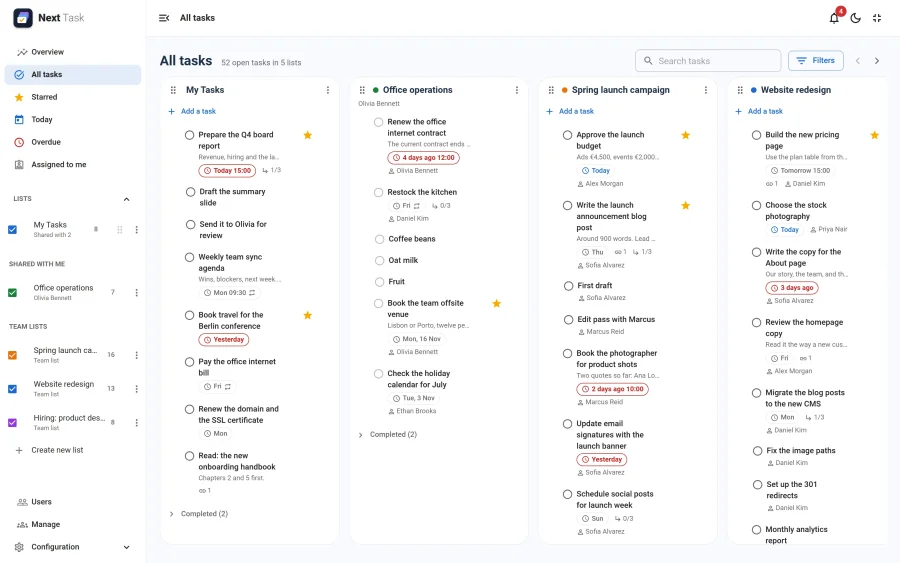
All Tasks Board
Every list at a glance, one column each.
- Your own column order Drag any column by its header (or its handle on touch screens), your own lists, shared lists and team lists alike. The order is yours alone and is saved with your account; it doesn't change the order of the lists panel or anyone else's board.
- Cards between columns Drag a task to another column to move it to that list, or within a column to reorder it.
- Drag to scroll Press on an empty part of the board (between columns, or below a column's cards) and drag to scroll the columns sideways, as on a Trello board. On touch screens the board scrolls with a swipe; a mouse wheel scrolls sideways once the page itself can't scroll further, or with Shift held.
- Hide and sort per list The checkboxes in the lists panel hide lists from the board, and each list keeps its own sort.
- An app All tasks can be switched off in the App Manager; the default list then takes its place as the home page.
More: All tasks board.
Navigation & Home Page
One menu for every screen, in both the embedded and the full-screen layout.
- Grouped navigation Overview, All tasks, Tasks, Users, Manage and Configuration (Settings, Roles, App Manager), each shown only to the people whose role allows it.
- Full screen In the administrator, the Full screen button hides Joomla's menu and toolbar and gives Next Task the whole window, with a collapsible sidebar; Next Task remembers it for the next visit. On the site it is available too but is not remembered, so the site template comes back on the next visit.
- Home page The site chooses what opens first (All tasks, the Overview or the person's default list) in Settings > System, and each person may choose their own in Settings > Preferences. Someone who can't open the Overview gets All tasks instead.
More: Full-screen and embedded layouts, Settings.
Dates & Recurrence
Scheduling without a calendar's complexity.
- Due date and optional time Date-only tasks sort and badge by day; timed tasks drive due-time reminders.
- Overdue highlighting Open tasks past their date turn red and gather in the Overdue view.
- Recurring rules Daily, weekly (weekday picker), monthly and yearly, with "every N" intervals, an end date, or an end after N occurrences.
- Regeneration on completion Completing a recurring task archives the instance and creates the next one, exactly once however often it is clicked; reopening removes the untouched next one again. Month ends are kept (Jan 31, Feb 28, Mar 31) and Feb 29 falls on Feb 28 in common years. A task ticked off late is not reborn overdue.
- Safety net The "Next Task: maintenance" scheduled task creates any next occurrence that a failed request left out.
More: Due dates and times, Recurring tasks.
Sharing & Assignment
Collaboration on top of the personal model.
- List sharing Grant view or edit to Joomla users or entire usergroups; shared lists are badged in every grantee's lists panel.
- Assignment Assign a task to anyone who can reach its list (its owner, or a person or group it is shared with); they get an email and a notification (each opt-out per user). Assignment opens nothing: on a list they can only view, an assignee may tick their task off, nothing else.
- Leave a list Someone a list was shared with by name can leave it from the list menu. Access that comes only through a usergroup can't be left. Removing a share, or leaving a group that had access, unassigns that person from the list's tasks.
- Server-side enforcement The permission ladder (owner > edit > view) is checked on every API call, not just hidden in the UI.
- Audit trail With plg_actionlog_nexttask enabled, creates, updates, completions, deletions and share changes land in Joomla's User Actions Log.
More: Sharing and team lists, Assignment.
Emails & Reminders
Delivery through Joomla's own scheduler, idempotent by design.
- Due-time reminders Sent the configured number of minutes before the due time for tasks with a time; a reminder missed by up to an hour (a scheduler gap) still goes out, older ones are left to the digest. Moving the due date re-arms it. Safe to run every few minutes without double-sending.
- Daily digest Today's and overdue tasks across all visible lists, once per day at each user's chosen time (default 09:00).
- Assignment notifications Immediate email to the new assignee when a task is (re)assigned.
- Per-user preferences Reminders, digest, digest time, assignment emails and bell notifications are each opt-out-able in the app's Settings screen.
- No mail configured? With Joomla's mail switched off nothing fails: the routines report why, and due reminders still reach the bell.
More: Reminders and the daily digest, Reminders and scheduled tasks.
Notifications & Installable App
Stay on top of things without an inbox.
- The bell A badge in the header with what happened to you: a task assigned to you, a list shared with you, your assigned task completed, a reminder. Click one to open it.
- Installable On HTTPS sites Next Task can be installed on a phone or desktop like an app; recently viewed lists and tasks stay readable offline, and changes made offline say plainly that they were not saved.
- Both are apps Switch the bell or the installable app off in the App Manager (see App Manager).
More: Notifications, Installable app and offline use.
Roles
Who may do what, set in the app.
- Custom roles A role is a grid of permissions, features by actions: view, create, edit, delete, complete and assign tasks; create, edit, delete and share lists; team lists; the Overview; users and User Notes; oversight, transfers and sharing; settings, apps and roles. Four roles come with Next Task: Administrator, Manager, Member and Viewer.
- Users and groups Assign a role to individual users or to whole Joomla usergroups. Roles add up: a person gets everything their own role and their groups' roles grant.
- Server-side enforcement Every permission is checked on every API call. See the Roles page.
More: Roles and quotas, Roles reference.
Overview, Users & Demo
For team leads and for showing Next Task off.
- Overview Site-wide figures, a Top 5 of the busiest people, and charts of the tasks created and completed over the last 30 days and of who carries the most open (and overdue) work. The Open and Overdue figures open the Users page, filtered.
- Users page Everyone who uses Next Task, with their lists, open, overdue and assigned counts and last visit: search by name, filter to people with open or overdue work, sort by any column and page through, all on the server, so it stays fast on large sites.
- Open someone's tasks A row on the Users page opens that person's tasks. Click one to read it, with its subtasks, even if you can't reach the list. It opens read-only; to change it you need access to the list.
- Demo data Loads sample lists and tasks so you can try Next Task straight away; remove them with one click.
More: Overview and users, Managing team lists, transfers and shares.
User Notes Bridge
Bridges task work with Joomla's core User Notes feature.
- Notes panel People whose role holds Users > Notes open any user's published User Notes.
- Task to note File a task (title, details, due date) as a User Note about the assignee or creator.
- Note to task Turn any User Note into a task in a list you can edit.
REST API
Machine access on Joomla's Web Services application.
- Endpoints v1/nexttask/lists and v1/nexttask/tasks with list, read, create, update (PATCH), delete, plus complete, move, restore, bulk actions and list members. See the REST API page.
- Authentication Joomla's standard API token via the X-Joomla-Token header; enable the core "API Authentication - Joomla Token" plugin.
- Permission parity API responses obey exactly the same owner/edit/view ladder as the app.
More: REST API.
Privacy & Security
Data protection by Joomla's own tooling.
- Privacy export All of a user's lists, tasks, assignments, preferences and notification history appear in privacy information requests.
- Privacy removal Requests remove owned data and detach the user from assignments on other people's lists.
- Deleted accounts When a Joomla user is deleted, their lists go to another user or are deleted (Settings > System > Deleted users), and their shares, assignments, preferences and notifications are removed. Needs the User - Next Task plugin.
- CSRF and ACL All writes are form-token checked with JSON error responses. What a person may do (see, create, edit, complete, delete and assign tasks, create and share lists, the Overview, settings, the App Manager) is decided by their roles, and checked on the server. A write needs both the role and access to the list.