Notifications
The bell in the header shows what happened to you in Next Task, with the number of unread notifications on it. Click it to open the list; click a notification to go to its task or list.
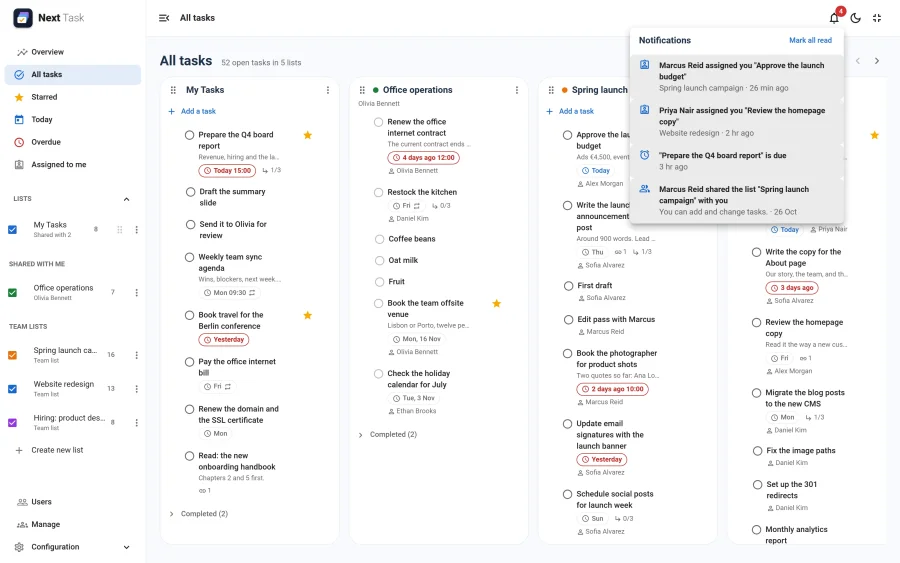
What Arrives
| Notification | When |
|---|---|
| Marcus Reid assigned you "…" | Someone else assigns a task to you. |
| Sofia Alvarez completed "…" | Someone completes a task they were assigned that you created. |
| Marcus Reid shared the list "…" with you | A list is shared with you, or with a group you are in. It says whether you can view or edit. |
| "…" is due | A timed task assigned to you (or on your own list, unassigned) reaches its due time: the bell's copy of the reminder email. |
Each shows who did it, the list, and how long ago.
Reading Them
- Opening a notification marks it read. Mark all read clears the count.
- The count refreshes about once a minute while the app is open (the check pauses while the tab is hidden).
- Read notifications are removed after 30 days, unread ones after 90 (by the maintenance routine).
Turning Them Off
- For yourself: Show notifications in the bell in Settings > Preferences.
- For the whole site: the Notifications app in the App Manager. The bell disappears and nothing new is added; reminder emails still go out.
See Notifications (configuration) for the details an administrator needs.