Recurring Tasks
A task can repeat daily, weekly, monthly or yearly. Completing it creates the next occurrence with the next due date, so a repeating task is always one open task, never a long list of future ones.
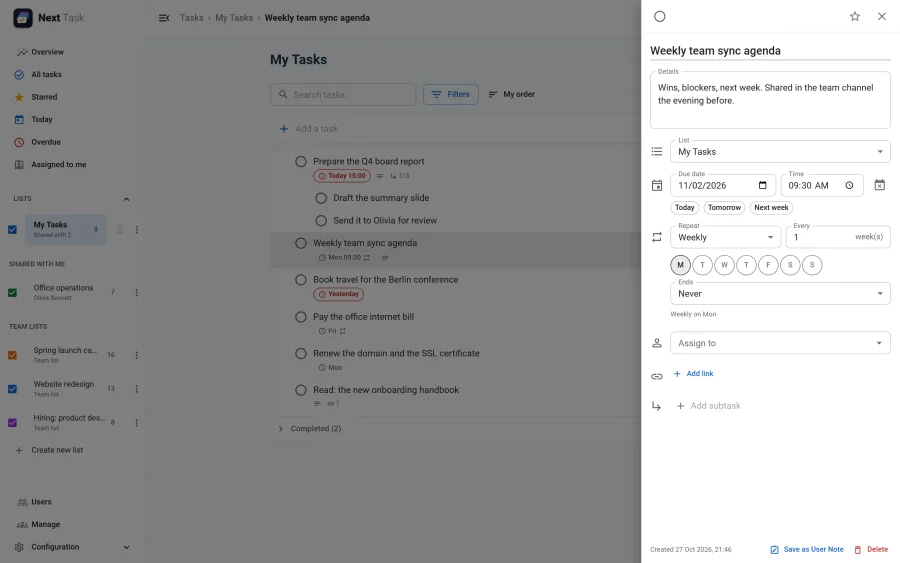
Setting a Repeat
Open the task, and choose Repeat: Daily, Weekly, Monthly or Yearly. Then:
- Every: every 1, 2, 3… days, weeks, months or years.
- Repeat on: for a weekly repeat, the weekdays (for example Monday, Wednesday and Friday).
- Ends: Never, On date (a last date), or After a number of times.
The row shows a repeat icon next to the date, and the drawer describes the rule in words ("Every 2 weeks on Mon", "Monthly, 6 times").
What Completing Does
- The completed task moves to Completed as usual, and a new task appears with the next due date: same title, details, links, star, assignee and list. Its subtasks come along, open again.
- The next date is counted from the due date, not from the day you tick it off. A task you complete late is moved forward to its next date that is not already past, so it isn't reborn overdue.
- Month ends are kept: a task due on 31 January repeats on 28 (or 29) February, then 31 March. A yearly task due on 29 February falls on 28 February in other years.
- It happens exactly once, however often the task is ticked and unticked, and from however many browsers.
- Reopening the completed task removes the next occurrence again, as long as nobody has touched it yet.
- When the series ends (its last date has passed, or it has run its number of times), completing the last task creates nothing.
Good to Know
- Subtasks can't repeat; their parent can.
- The Next Task: maintenance scheduled task creates any next occurrence a failed request left out (see Reminders and scheduled tasks).
- Recurring Tasks is an app. Switched off in the App Manager, completing a repeating task creates nothing; the rules are kept for when it is back.