All Tasks Board
All tasks shows every list you can reach side by side, one column per list, like a board. It is the default home page: what opens first when you start Next Task, unless the site or you chose another one (see Settings).
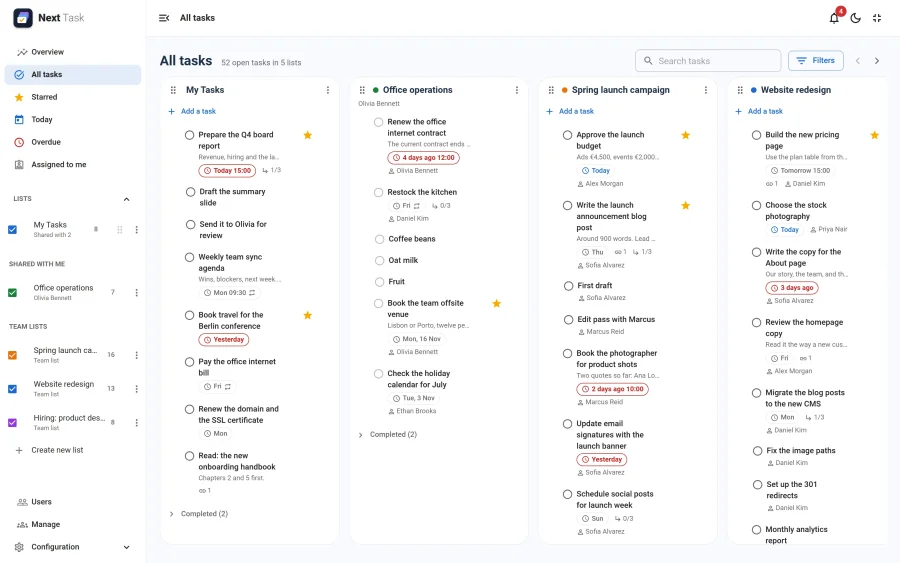
The heading counts the open tasks across the columns shown. Each column has its own Add a task field, its list menu, and a collapsed Completed section at the bottom.
Columns
- Your own lists come first, then the lists shared with you, then team lists, until you put them in another order.
- Drag a column by its header (or by its handle on a touch screen) to move it. The order is yours alone and is saved with your account: it doesn't change the order of the lists panel, or anybody else's board.
- Hide a column with the checkbox next to the list in the lists panel. Hidden lists stay hidden on the board until you tick them again; nothing else changes.
- Each column keeps its list's sort (My order, Date, Starred or Title), chosen in the list's menu.
- The arrows next to Filters scroll the board one column at a time.
Cards
- Click a card to open the task drawer.
- Drag a card within a column to reorder it (in My order), or onto another column to move it to that list. A task you can't edit, or a list you can only view, doesn't accept the drop.
- Subtasks sit under their parent task, indented.
- The chips on a card show the due date (red when overdue), a repeat icon, the subtask count, the number of links and the assignee.
Drag to Scroll
Press on an empty part of the board (between columns, or below a column's cards) and drag sideways to scroll it, as on a Trello board. On a touch screen, swipe. A mouse wheel scrolls sideways once the page itself can't scroll further, or with Shift held.
Search and Filters
The search field and Filters narrow every column at once: by text, by due date (today, overdue, has a date, no date), starred only, and whether completed tasks are shown.
Switching It Off
All tasks is an app. Switched off in the App Manager, the board disappears from the navigation, and anyone whose home page was All tasks opens their default list instead.