Currencies
Guests can see prices converted to their own currency. The conversion is for display only: checkout and payment always use the property's own currency.
The Currencies page is under Configure > Currencies, there while the Multi-currency app is on. The app is off on a new install: switch it on under Configure > Apps.
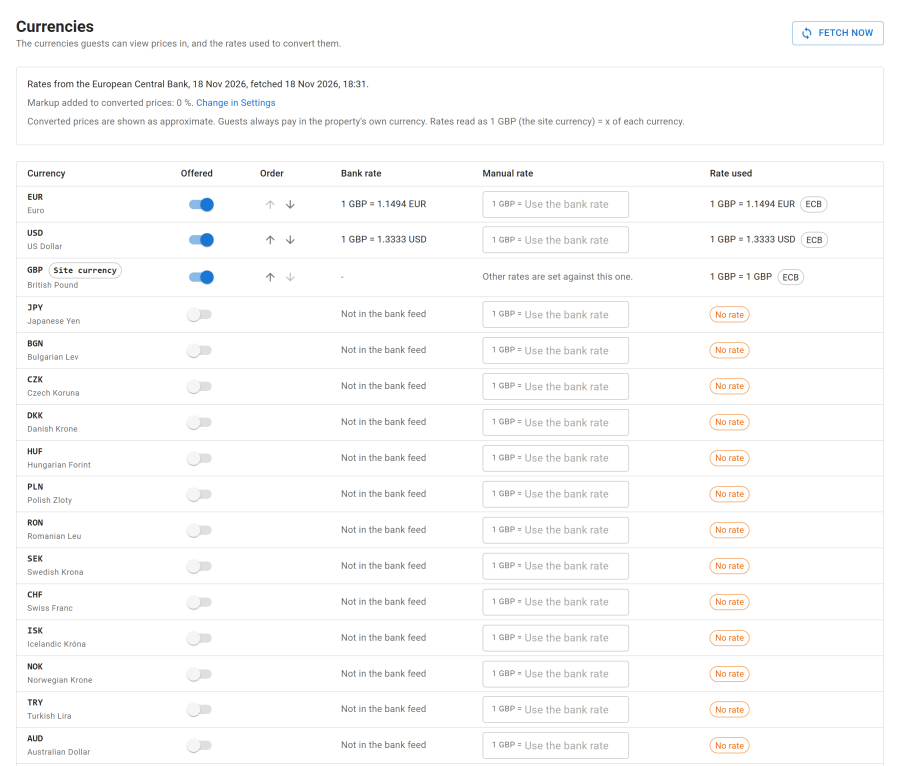
The page
The Site currency is at the top: every other rate is set against it, and reads as 1 of the site currency = x of each currency.
For each currency:
| Column | Meaning |
|---|---|
| Offered | Tick to offer it to guests |
| Bank rate | The European Central Bank's reference rate, or Not in the bank feed |
| Manual rate | Your own rate, which wins over the bank rate. Use the bank rate clears it |
| Rate used | What the site converts with |
A currency with No rate must get a manual rate before it can be offered. Put the offered currencies in the order guests see them with Move up and Move down.
Fetch now reads the bank rates at once. Otherwise the Exchange rates for display currencies task reads them every day; a failed read keeps the last rates. The page shows the date of the rates and when they were fetched.
Settings
Under Configure > Settings > Currencies:
| Setting | Effect |
|---|---|
| Markup on converted prices | Added to every converted price, from 0 to 10%, to allow for card exchange fees |
| Guess the guest's currency | On a first visit, picks the currency from the browser's language region (de-DE gives EUR), if that currency is offered |
On the website
Publish the Currency module where visitors pick their currency, as a menu, chips or a drop-down. Converted prices are marked as approximate. See Site modules.