Reviews
Only guests who stayed can review a property. After departure each guest is invited by email to review their stay; you publish, reject or reply to what they write.
The reviews pages are there while the Reviews app is on.
How guests review
- After departure the guest receives a review link by email. It also shows on their booking page while a review can be written.
- The link works for the Review window you set under Configure > Settings > Reviews.
- The guest gives overall stars, ratings for Cleanliness, Accuracy, Location and Value, a headline and their text.
One booking gives one review, so every review comes from a real stay.
Moderating
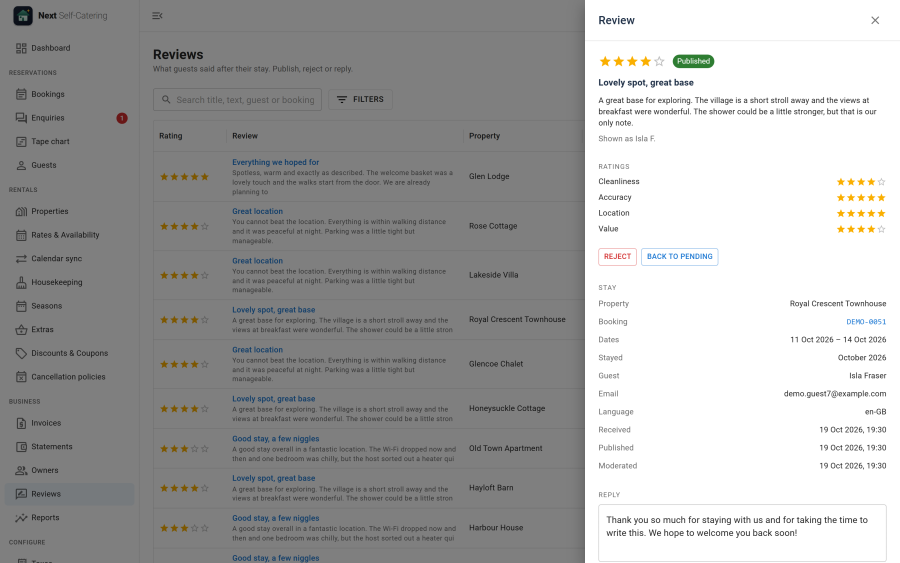
Open Business > Reviews. New reviews are Pending. Open one to:
- Publish it, or Reject it, or put it Back to pending
- write a public Reply, shown under the review on the property page
- see the booking, the dates of the stay and the guest's language
- delete it
Under Configure > Settings > Reviews:
| Setting | Effect |
|---|---|
| Review window (days) | How long after departure the guest can write a review |
| Publish good reviews at once | Reviews at or above the lowest rating below go live without moderation |
| Lowest rating to publish at once | From 1 to 5 stars and above |
| Email staff about new reviews | Sends the staff address an email for each new review |
Where reviews show
- The Reviews section of the property page, with the average rating and the category ratings. See Property page.
- The guest rating on property cards, and the guest rating filter on the Properties list.
- The Reviews module, as a slider or a grid. See Site modules.
- The property's structured data for search engines carries its rating. See SEO.