Owners and statements
For agencies that let other people's properties: record each owner, decide how every charge on a booking is shared, send a monthly statement with the commission invoice, record what you paid, and give owners their own portal.
These pages are there while the Owners app is on.
Owners
Open Business > Owners and click New. The owner editor has four tabs:
| Tab | What it holds |
|---|---|
| Profile | Name, company, VAT number, address, email, phone, language, notes, the Joomla account for the owner portal, and Tell the owner about housekeeping issues |
| Commission | The owner's commission rules, or the Default rules |
| Payout details | Payout method and bank details. Bank details are stored encrypted and shown only as their last digits. Reveal shows them in full, and who revealed them, and when, is written to the audit log |
| Statements | The owner's statements |
A property is linked to its owner on the General tab of the property editor.
Commission rules
For each kind of charge on a booking you choose where the money goes:
| Charge | Examples |
|---|---|
| Accommodation | The rent, after discounts |
| Supplements | Extra guests, pets and other supplements |
| Extras | Optional extras the guest booked |
| Cleaning fee | The cleaning fee charged to the guest |
| Booking fee | Any other fee on the booking |
| Tourist tax | Tourist tax collected online |
Each charge goes to the Owner, less commission (with a commission percentage), All to the owner, is Kept by the agency, or is Not on statements.
The default rules are set under Configure > Settings > Owners, together with whether shares are worked out on amounts net of VAT or including VAT, and the VAT on agency charges.
Monthly statements
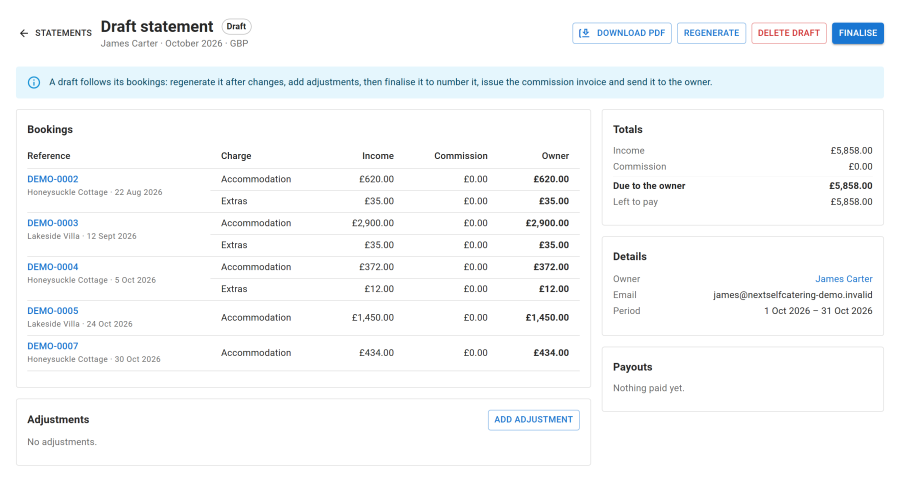
Open Business > Statements.
- Drafts. Each month the Owner statements task drafts last month's statements from the bookings that departed in that month, once the Statement day (Configure > Settings > Owners) has come. It refreshes the drafts on later runs until you finalise them. Generate statements makes them by hand, for every owner or for one owner in one currency.
- Review. A statement shows the income, commission, charges (such as the owner cleaning charge), VAT on charges, credits, the balance brought forward and the balance Due to the owner or Owed by the owner, with the bookings it covers. A cancelled booking shows the share the agency kept.
- Adjust. Add adjustment for a repair (Charge to the owner) or a goodwill payment (Credit to the owner).
- Finalise. The statement gets its number and can no longer change; later corrections go on the next statement. Finalising issues the commission invoice and, when Email the owner on finalising is on, emails both PDFs to the owner.
You can draft the current month as a preview, but a statement can only be finalised once its month has ended on your site's clock, so stays still to come are never left out.
Payouts
Record what you paid each owner against their statements. A statement shows what was paid and what is Left to pay, and balances carry forward to the next month. Payouts are recorded by hand and can be downloaded as a CSV with the owners' bank details, for your bank.
The owner portal
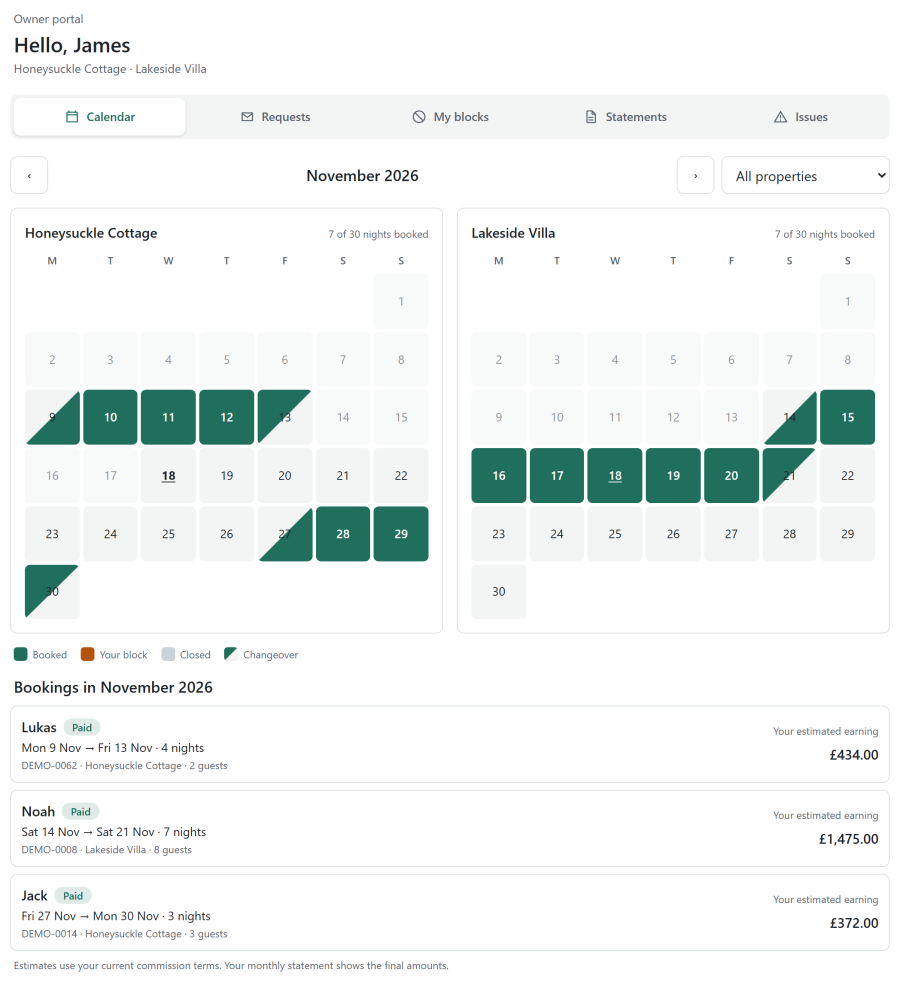
Link the owner to a Joomla account on their Profile tab and publish an Owner Portal menu item in a menu only registered users see. When the owner logs in they see:
| Tab | What it shows |
|---|---|
| Calendar | Their properties' booked nights, closed nights and their own blocks, and the month's bookings with Your estimated earning |
| My blocks | Dates they blocked for their own use. Owners can add and remove blocks; staff get an email when they do |
| Statements | Their finalised statements and commission invoices as PDFs |
| Issues | Problems cleaners reported at their properties |
| Requests | Booking requests for their properties (properties booked on request). With Owners can answer booking requests on, they can approve or decline them |
Estimates use the owner's current commission terms; the monthly statement shows the final amounts. Owners see a guest's first name and the size of the party, never their contact details or your staff notes.
See also
- Reports: owner earnings from finalised statements
- Housekeeping
- Settings