Housekeeping
Every departure needs a clean before the next guests arrive. Housekeeping builds that schedule from the bookings by itself, gives cleaners their jobs on a phone or a shared tablet, and brings their checklists, inspection photos and reported problems back to you.
Open Rentals > Housekeeping. The page is there while the Housekeeping app is on. It has four tabs: Schedule, Housekeepers, Checklists and Devices.
The schedule
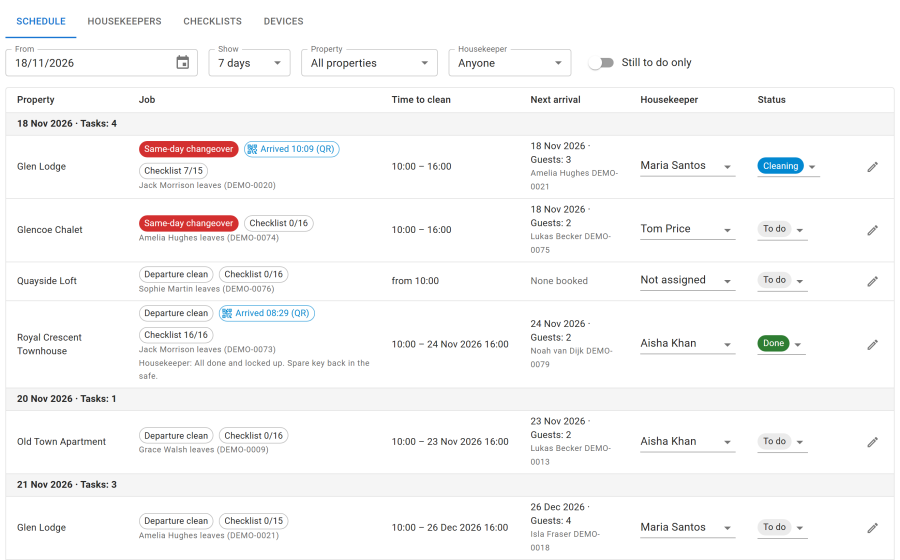
- Every departure gets a Departure clean, from check-out time until the next guests check in. A departure on the same day as the next arrival is marked Same-day changeover.
- Stays imported from other channels get a clean too, marked Imported calendar.
- Add Other jobs by hand with Add task: a deep clean, a linen change, a repair.
- Each job shows the Time to clean, the Next arrival with the number of guests and pets, the housekeeper and the status: To do, Cleaning, Done, Issue found or Cancelled.
The schedule follows bookings and imported calendars for the next 90 days. Booking changes update it straight away; the Housekeeping schedule task repairs anything missed every hour, and emails housekeepers about new, moved and cancelled jobs. Update from bookings runs it at once.
Filter by days, property and housekeeper, or show Still to do only.
Housekeepers
On the Housekeepers tab, add the people who clean:
| Field | Meaning |
|---|---|
| Cleans by default | The properties whose jobs go to this person automatically |
| Site login | An optional Joomla account, to open their jobs on a Housekeeper Jobs menu item |
| Private link | A secret link that opens their jobs without a login. Copy link, New link (the old one stops working) or Email link |
| PIN | 4 to 6 digits to sign in on a shared device. Easy PINs such as 0000 or 1234 are refused. Only a scrambled copy is kept |
| Active | An inactive housekeeper cannot open their jobs |
Pay per job is recorded on each finished job, for the cleaner pay report. Leave it empty if you do not track it. The private link shows the housekeeper's jobs without guest names or contact details.
The cleaner app
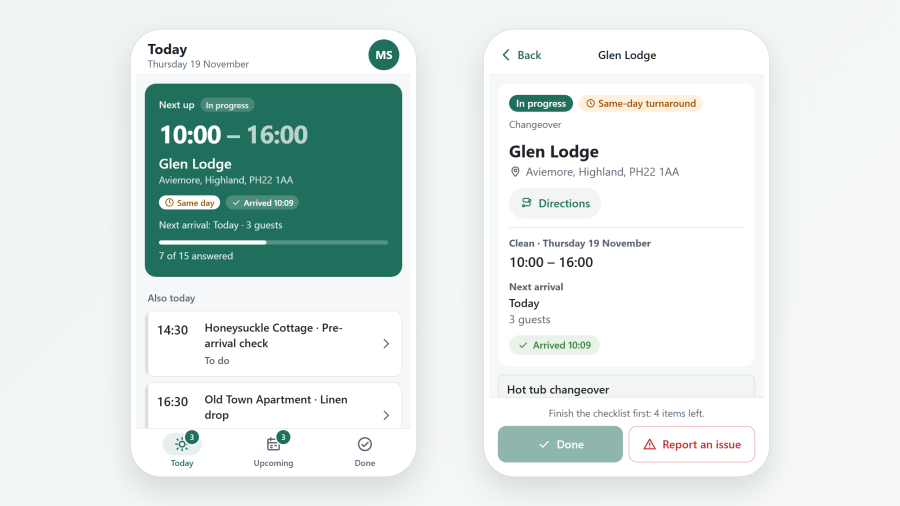
Cleaners see today's jobs, upcoming jobs and jobs done. On a job they start cleaning, work through the checklist, add notes and photos, report a problem and mark it done.
The app opens from the private link, from the Housekeeper Jobs menu item, or on a paired device. It is an installable web app: on a phone or tablet it goes on the home screen, runs full screen, keeps working through a weak signal and updates itself. Browsers only offer installation on an HTTPS site. See Cleaner app for installing it on Android and iPhone.
Shared devices and PINs
On the Devices tab, add a shared tablet or team phone, choose the properties whose jobs it shows, and Pair it: scan the QR code with the device's camera, or open the pairing link on it. The code works once, for a few minutes.
On a paired device, a cleaner taps their name and types their PIN. Too many wrong PINs lock sign-in for a while; setting a new PIN unlocks it. Revoke stops a device at once and signs everyone out on it.
Under Configure > Settings > Housekeeping, choose whether PIN sign-in works only on paired devices, or with email and PIN on any device.
Property QR codes
Property QR codes on the Housekeeping page prints a QR code for each property. Stick it inside the property. Scanning it opens the cleaner's job there and logs their arrival. If a code is renewed, print it again and replace the sticker.
Checklists
On the Checklists tab, make the lists cleaners tick off: sections and items, with Instructions. Items can be required (they cannot be skipped or marked N/A) or need a photo (up to 3 per item).
A checklist is used for the kinds of job you tick (departure clean, same-day changeover, other job) on the properties you choose, or only when picked on a job. Jobs already started keep their copy when you change the checklist.
Inspections and damage
At the end of a job the cleaner files an inspection: All fine or Problem found, with notes and up to 8 photos. Staff can file one from the booking too.
The inspection shows on the booking, beside the damage deposit, so you can decide whether to capture part of it. See Payments and deposits.
Reported problems are emailed to the staff address, and to the property's owner when Tell the owner about housekeeping issues is on in the owner's profile. The owner's email never names the cleaner. Inspection photos are private: only staff who may see housekeeping open them. On nginx, see the deny rule in Compatibility.
Cleaning costs
Each finished job records the cleaner's pay, for the Cleaner pay report, and a property can carry an owner cleaning charge (on the General tab of its editor) that appears on the owner's statement. See Reports and Owners and statements.
See also
- Automations and SMS: send a cleaner notice at a moment you choose
- Menu items and frontend pages