Scheduled tasks
Much of what Next Self-Catering does happens in the background: freeing unpaid holds, sending emails, charging balances, reading channel calendars, running automations. This work is done by Joomla's own Scheduled Tasks, through the Task - Next Self-Catering plugin that comes with the package.
If emails never arrive, holds never expire or balances are not charged, the cause is nearly always here.
The tasks
The installer creates 14 tasks. Open System > Manage > Scheduled Tasks to see them.
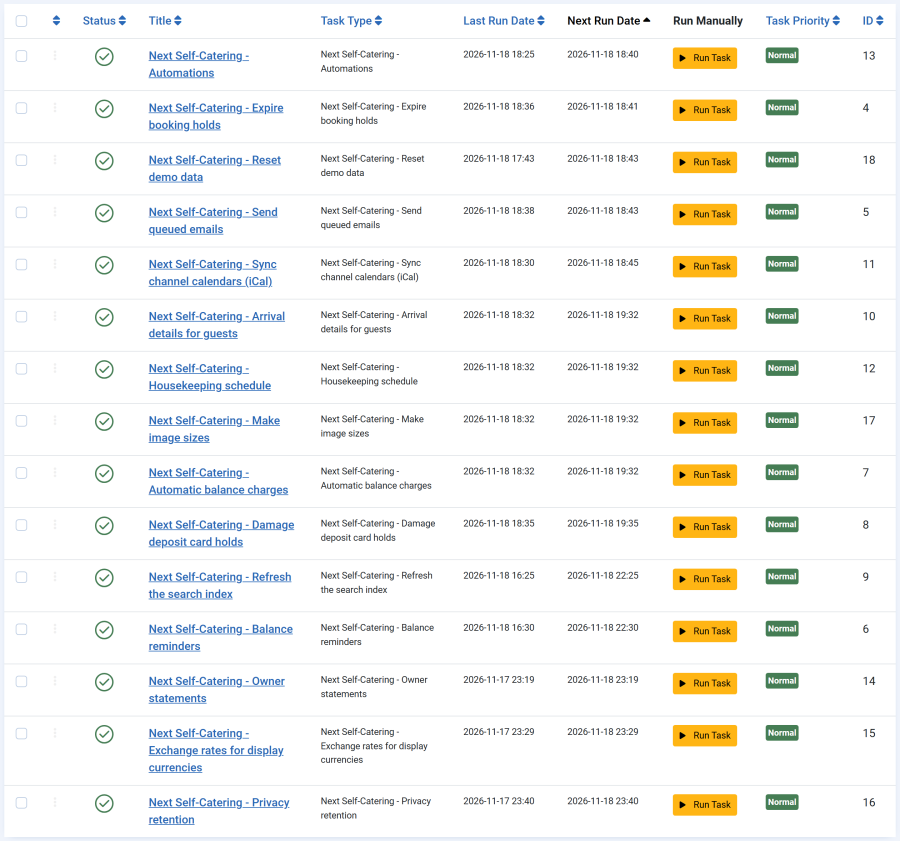
| Task | Runs | Does |
|---|---|---|
| Expire booking holds | Every 5 minutes | Expires unpaid bookings past their hold, and booking requests nobody answered in time, and frees their nights |
| Send queued emails | Every 5 minutes | Sends queued emails, text messages, cleaner notices and webhooks, and retries failed ones |
| Sync channel calendars (iCal) | Every 15 minutes | Reads the Airbnb, Booking.com, Vrbo and other calendars set on each property and blocks their dates. Each calendar is read at most every 10 minutes |
| Automations | Every 15 minutes | Runs the automations whose moment has come |
| Automatic balance charges | Hourly | Takes balances that have fallen due from the cards their guests agreed to save |
| Damage deposit card holds | Hourly | Places the card holds guests agreed to near the end of their stay, and lets them go once the inspection is over |
| Arrival details for guests | Hourly | Emails each guest their booking page when its arrival details open |
| Housekeeping schedule | Hourly | Keeps cleaning jobs in step with bookings and imported calendars for the next 90 days, emails housekeepers about new and changed jobs, and deletes inspection photos never filed within 24 hours |
| Make image sizes | Hourly | Makes the smaller AVIF, WebP and JPEG/PNG copies of property photos still waiting (up to 50 per run), and removes copies no longer used |
| Balance reminders | Every 6 hours | Reminds guests of a balance falling due, once per booking |
| Refresh the search index | Every 6 hours | Rebuilds and rolls forward the availability the property search reads |
| Owner statements | Daily | Drafts last month's owner statements from the statement day of the month on, and refreshes them until they are finalised |
| Exchange rates for display currencies | Daily | Reads the European Central Bank's reference rates. A failed read keeps the last rates |
| Privacy retention | Daily | Clears guest details once the retention period has passed. Does nothing while the period is 0 |
Each task's title starts with "Next Self-Catering - ". Bookings and changes in the admin update the search index and the housekeeping schedule straight away; those tasks repair anything missed.
The tasks of the Guest portal, iCal sync, Housekeeping, Owners and Multi-currency apps do nothing while their app is switched off. A public demo site also has a Reset demo data task; it does nothing on any other site.
If a task is missing, reinstall the package over the top: the installer creates the missing Next Self-Catering tasks again. Uninstalling the package removes them.
Making sure the scheduler runs
Creating the tasks is not enough: something has to start Joomla's scheduler. There are two ways, set under System > Manage > Scheduled Tasks > Options.
| Method | How it works | Good for |
|---|---|---|
| Lazy scheduler | Visits to the site start the tasks. On by default in Joomla | Sites with steady traffic. On a quiet site, tasks run late or not at all at night |
| Web cron or a server cron job | The server calls the scheduler on a timer, visitors or not | Reliable timing. Recommended, so a balance due at night is still charged |
A server cron job that runs every minute looks like this:
* * * * * php /path/to/your/site/cli/joomla.php scheduler:runUse the PHP binary your site runs on (8.1 or newer), and the real path to your site.
Checking that it works
- In the Scheduled Tasks list, the Last Run of each Next Self-Catering task should be recent.
- To run a task at once, select it and use Joomla's Run Test button.
- Configure > Emails > Sent and queued shows whether emails leave the outbox.
The other plugins
The package also installs and enables these plugins. Keep them enabled.
| Plugin | Purpose |
|---|---|
| Privacy - Next Self-Catering | Adds guest data to Joomla's Privacy export and removal requests |
| Smart Search - Next Self-Catering | Indexes properties for Joomla Smart Search |
| User - Next Self-Catering | Keeps guest, owner and housekeeper links right when a Joomla account's email changes or the account is deleted |
| Payment and SMS plugins | Stripe, PayPal, Bank transfer, Twilio and HTTP gateway. Switch them off in the App Manager, not in Joomla's plugin manager |