Settings
The site-wide settings of Next Self-Catering are under Configure > Settings, one section per subject in a side menu. Staff whose role has Manage on Settings & apps can change them; Super Users always can.
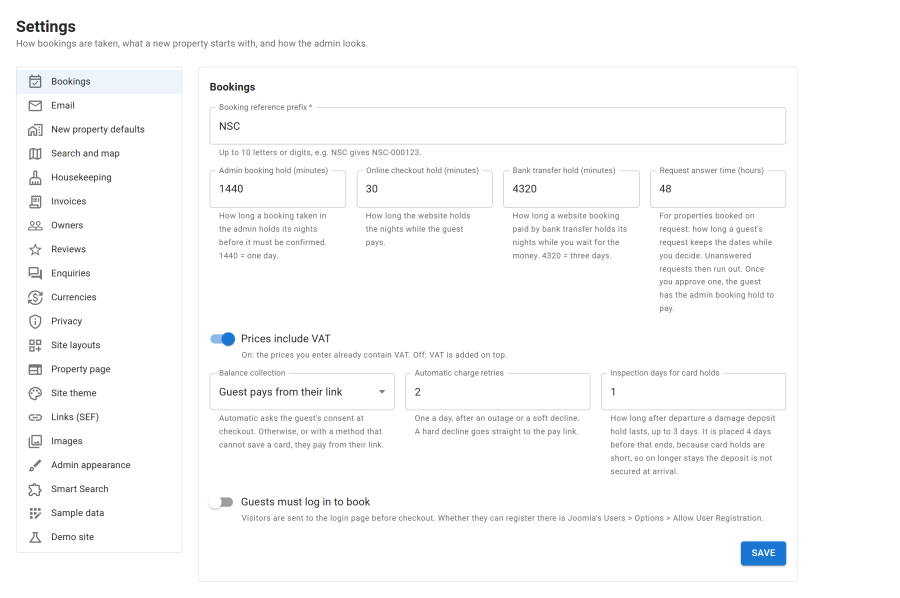
Each section is saved with its own Save button. Sections of an app that is switched off are hidden.
Bookings
| Setting | Effect |
|---|---|
| Booking reference prefix | Up to 10 letters or digits: NSC gives NSC-000123 |
| Online checkout hold (minutes) | How long the website keeps the nights while the guest pays (30 by default) |
| Bank transfer hold (minutes) | How long a website booking paid by bank transfer keeps its nights while you wait for the money. 4320 is three days |
| Admin booking hold (minutes) | How long a booking taken in the admin keeps its nights before it must be confirmed. 1440 is one day |
| Request answer time (hours) | For properties booked on request: how long a request keeps the dates while you decide (48 by default) |
| Prices include VAT | On: the prices you enter contain VAT. Off: VAT is added on top |
| Balance collection | The default for properties: the guest pays from their link, or automatically from a saved card |
| Automatic charge retries | Daily retries after an outage or a soft decline |
| Inspection days for card holds | How long after departure a damage deposit hold lasts, up to 3 days |
| Guests must log in to book | Visitors are sent to the login page before checkout |
| Setting | Effect |
|---|---|
| Website address | Used for the links in emails. Filled in on your first visit; change it if the site moves |
| From name and From address | The sender of booking emails. Empty uses Joomla's Global Configuration |
| Staff address | Gets new bookings, payment warnings and other staff emails |
| Balance reminder, days before due | When the balance reminder goes out |
The email texts themselves are on their own page. See Email templates.
New property defaults
The values a new property starts with: Currency, Deposit (% of total), Balance due (days before arrival), Damage deposit collected, and check-in and check-out times. Each property can change them in its own editor.
Search and map
| Setting | Effect |
|---|---|
| Map | OpenStreetMap or Google Maps |
| Google Maps API key | A browser key with the Maps JavaScript API. Without one the site shows OpenStreetMap |
| Map centre latitude, longitude and zoom | Where maps start when no property is shown |
| Results per page | On the Properties list, unless the menu item sets its own |
| Days ahead to search | How far ahead guests can search for free dates (90 to 730) |
Housekeeping
PIN sign-in: Paired devices only, or Paired devices and any device (email + PIN). Private links and site logins work either way. See Housekeeping.
Invoices
The issuer printed on invoices (business name, address, country, VAT number, company registration number, email, phone), a logo and a footer, Issue the invoice automatically when a booking is paid in full, and the formats of Invoice numbers and Credit note numbers. See Taxes and invoices.
Owners
Default commission rules, Shares computed on (amounts net of VAT or including VAT), VAT on agency charges, the number formats of statements, commission invoices and commission credit notes, the Statement day (1 to 28), Email the owner on finalising, a Footer on owner documents, and Owners can answer booking requests. See Owners and statements.
Reviews
Review window (days), Publish good reviews at once, Lowest rating to publish at once and Email staff about new reviews. See Reviews.
Enquiries
Enquiry number format, Captcha, Confirm to the guest and Email staff. See Enquiries.
Currencies
Markup on converted prices (0 to 10%) and Guess the guest's currency. See Currencies.
Privacy
The Privacy policy page and Terms and conditions page, the consent checkboxes at checkout and on the enquiry form, and Keep guest details for (years). See Privacy and GDPR.
Site layouts
The layouts of the public site, chosen from picture tiles: Property card, Property list, Filters, Property page, Pages of results, Booking and Checkout, plus the property page sections, the filter groups and the number of quick amenity chips. Layouts your template adds show up as tiles too. Menu items and properties can override these choices. See Search and the properties list, Property page and Checkout and booking modes.
Property page
The look of property pages: block style, highlights row, section menu, folding on phones, description length, amenities shown, map height, prices on the calendar, the position of the booking box, where Ask a question appears, and the buttons by the title. A live preview shows the result. See Property page.
Site theme
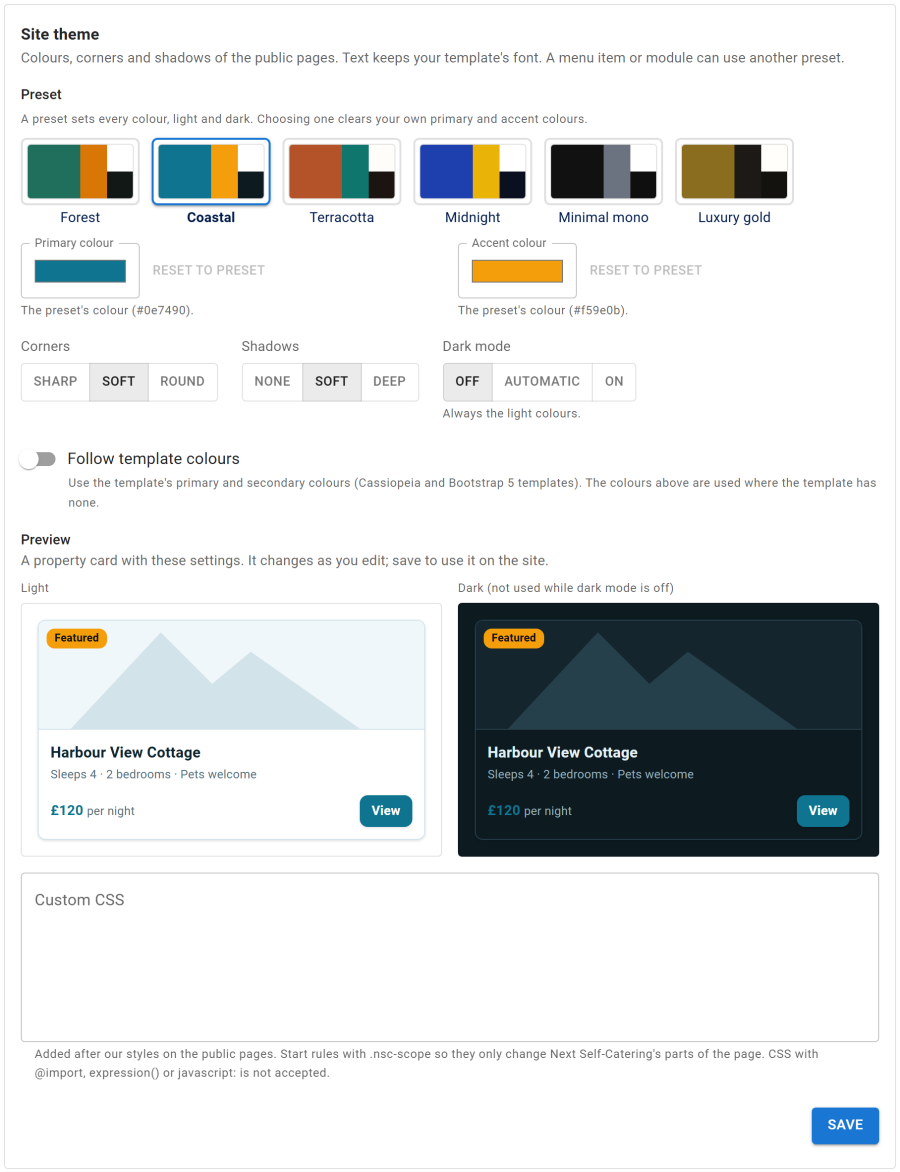
The colours of the public pages:
- Preset: Forest, Coastal, Terracotta, Midnight, Minimal mono or Luxury gold, each with light and dark colours
- Primary colour and Accent colour of your own, Corners (sharp, soft, round) and Shadows (none, soft, deep)
- Dark mode: off, automatic (follows the visitor's device) or on
- Follow template colours: takes the primary and secondary colours of Cassiopeia and other Bootstrap 5 templates
- Custom CSS
A preview shows a property card in light and dark. A menu item or a module can use its own preset. Fonts always come from your template.
Links (SEF)
Property address, Show the location in property addresses, Page words and Landing pages. See SEO.
Images
What your server can make, how many photos are ready, Generate missing, Rebuild all and Make AVIF copies. See Images.
Smart Search
Taxonomies to Index for the Smart Search plugin. See Smart Search.
Admin appearance
Primary colour of the admin app's buttons and highlights. The app's light, dark or follow-Joomla theme is switched from its header by each user.
Sample data
Install or remove the sample data. See Demo and sample data. The setup wizard can be opened again from here too.