Payments and deposits
Holiday lets are paid in steps: a deposit when the guest books, the balance a few weeks before arrival, and often a damage deposit as well. Next Self-Catering collects each step, online or by hand.
The payment methods themselves (Stripe, PayPal, bank transfer) are set up under Configure > Payment methods. See Payment methods, and for each provider's setup Stripe, PayPal and Bank transfer.
Deposit and balance
Each property sets, on the Deposits tab of its editor:
- Deposit: a percentage of the total or a fixed amount, taken at booking. A deposit of 0% takes the full payment at once.
- Balance due: the number of days before arrival the balance is due. A booking made later than that pays in full.
- Balance collection: Guest pays from their link after a reminder, Automatic, from a saved card, or Use the global setting (Configure > Settings > Bookings). Automatic asks for the guest's consent at checkout; without it, or with a method that cannot save a card, the guest pays from their link.
New properties start with the defaults of Configure > Settings > New property defaults.
Balance reminders
The Balance reminders task emails guests before the balance falls due, once per booking. Set how many days before under Configure > Settings > Email > Balance reminder, days before due.
Automatic balance from a saved card
With Stripe, the guest can agree at checkout to save their card. PayPal and bank transfer cannot save a card. The balance is then charged on its due date by the Automatic balance charges task, and the guest is told beforehand.
- A soft decline or an outage is retried once a day, up to Automatic charge retries (Configure > Settings > Bookings).
- A hard decline stops automatic collection and sends the guest their pay link. The booking shows the reason.
- The guest can remove the saved card from their booking page.
The site never stores the card number. It keeps only the card brand, the last four digits and the expiry date.
Damage deposits
Each property sets a damage deposit amount and how it is collected:
| Collected | How it works |
|---|---|
| With the balance | Added to the balance payment |
| On arrival | Collected at the property; shown to the guest in the payment schedule |
| As a card pre-authorisation | A hold reserved on the saved card near the end of the stay, by the Damage deposit card holds task |
Card holds are short, so a pre-authorisation is placed 4 days before it has to end and lasts up to Inspection days for card holds after departure (at most 3, Configure > Settings > Bookings). On a longer stay the deposit is therefore not secured at arrival. After the inspection you either Capture what the damage cost, once, or Let go. A hold nobody touches is let go automatically. Inspections are described in Housekeeping.
Payments on a booking
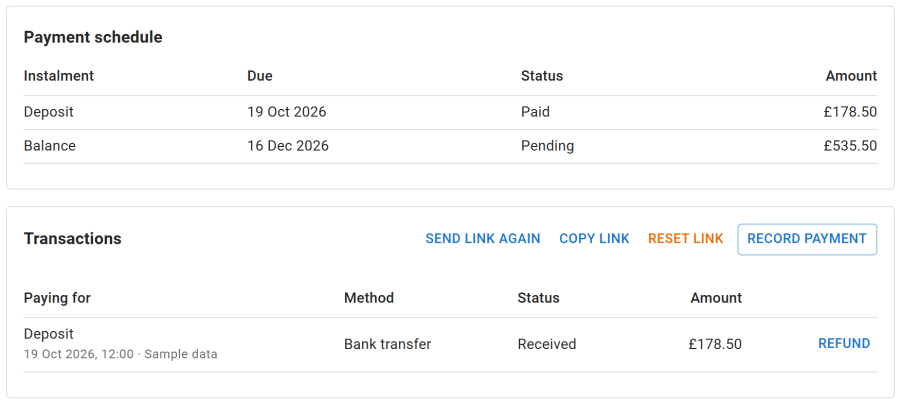
The payments card of each booking shows what is due and what was paid. From there staff can:
- record a payment received by hand, by bank transfer or in cash
- refund in full or in part, through the original provider for Stripe and PayPal (see Cancellations and refunds)
- reset or resend the guest's booking link
- read the audit trail of every payment event
Warnings
The booking shows a warning, and staff get an email, when:
- a payment is disputed (a chargeback), and again when the dispute is won or lost
- a refund failed at the provider
- a payment arrived after its hold ran out and the nights were taken meanwhile, so a refund may be owed
- a balance charge got no answer from the payment provider
Webhooks
Stripe and PayPal confirm payments to your site through a webhook, so a booking is confirmed even when the guest closes the page before returning. Each method shows its webhook address on its Webhook tab. The address and the exact events to register are in Integrations > Stripe and Integrations > PayPal.