Email templates
Every email Next Self-Catering sends to guests, staff, housekeepers and owners is a template you can edit. Open Configure > Emails. The page has two tabs: Templates and Sent and queued.
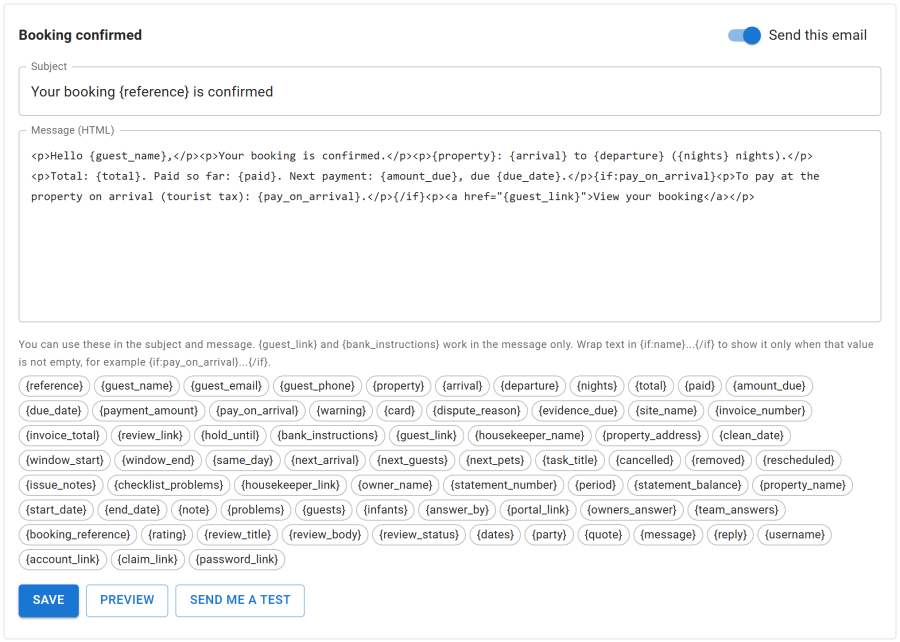
Editing a template
Click a template to edit its Subject and Message (HTML). Below the editor, the page lists the placeholders the template can use, such as the guest's name, the property, the dates, the amounts and the booking link.
{guest_link}and{bank_instructions}work in the message only.- Wrap text in
{if:name}...{/if}to show it only when that value is not empty, for example{if:pay_on_arrival}...{/if}.
Preview shows how the email looks. Send me a test sends it to your own address.
Send this email switches a template on or off. A template that is off is marked off in the list, and that email is not sent.
Translations
On a multilingual site, Add translation starts a copy of the template in another language, as a copy of the main one. Guests get the copy in the language they booked in; a language without a copy falls back to the main language, then to English. The main copy cannot be deleted.
The templates
| For | Templates |
|---|---|
| Guests: booking | Booking received (payment waiting), Booking confirmed, Paid in full, Booking cancelled, Reservation ran out, Booking link on request, Arrival details |
| Guests: requests | Booking request received, Booking request accepted (pay link), Booking request declined, Booking request ran out |
| Guests: payments | Payment receipt, Refund issued, Balance reminder, Balance will be charged to the saved card, Saved card could not be charged, Invoice issued, Credit note issued |
| Guests: accounts | Account created at checkout, Account created by staff, Add earlier bookings to an account, Account email changed (to the old address) |
| Guests: enquiries | We have your question, Reply to an enquiry |
| Staff | New booking, New booking request, Payment warning, Payment disputed, Dispute won, Dispute lost, Refund failed, Housekeeper reported an issue, Owner blocked dates, New guest review, New enquiry |
| Housekeepers | Private link, New job, Job moved or cancelled |
| Owners | Statement, Issue reported at their property, New booking request for their property |
Staff emails go to the Staff address under Configure > Settings > Email. The sender is the From name and From address there, or Joomla's Global Configuration when empty.
Text messages and extra emails sent at a moment of your choice are made with automations, not here.
Sent and queued
Emails go out through an outbox, sent by the Send queued emails task every 5 minutes. The Sent and queued tab lists each message with its recipient, its date and its status: Waiting, Sending, Sent or Gave up.
A message marked Gave up shows its error. Fix the cause (usually Joomla's mail settings in System > Global Configuration > Server) and click Retry.