Automations and SMS
Automations send emails, text messages, cleaner notices and webhooks on booking events or at a moment around a stay: a reminder a week before arrival, a door code on the arrival day, a thank-you after departure.
Open Configure > Automations and click New automation.
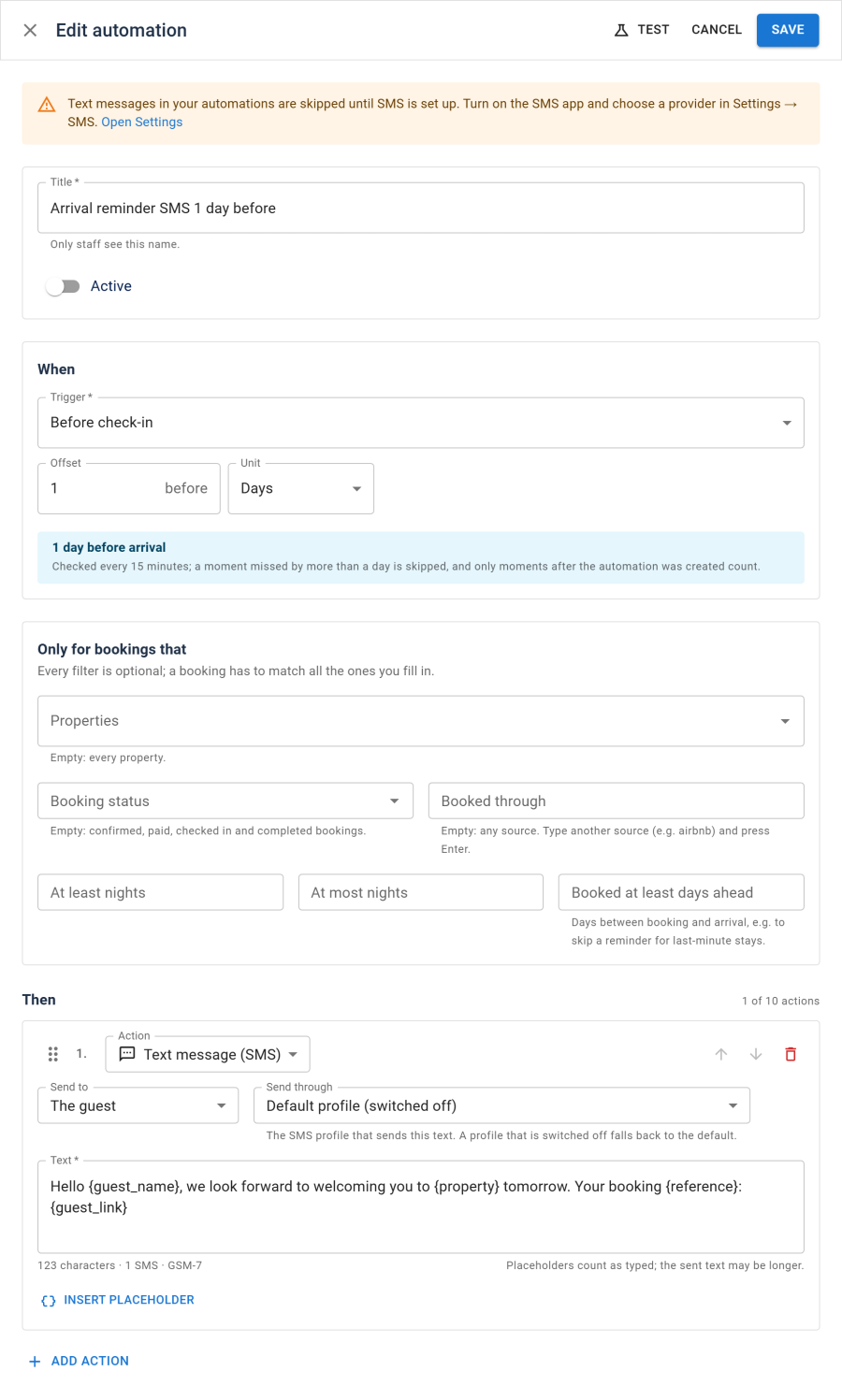
When
Choose a Trigger and an Offset in minutes, hours or days:
| Group | Triggers |
|---|---|
| Booking events | Booking made, Booking confirmed, Booking paid in full, Booking cancelled (each a set time after the event; 0 sends it right away) |
| Stay | Before check-in, On the arrival day (at a time of day, in the property's time zone), After check-in, Before check-out, After check-out |
| Payments | Before the balance is due, Balance overdue |
Automations are checked every 15 minutes by the Automations task. A moment missed by more than a day is skipped, and only moments after the automation was created count, so a new automation does not message every past booking.
Only for bookings that
Every filter is optional; a booking has to match all the ones you fill in: property, status, booking source, length of stay, lead time and the guest's language.
Then
Add up to 10 actions, in the order they should run:
| Action | Sends |
|---|---|
| An email to The guest, Staff (the staff address in Settings) or Another address, with your subject and message and the same placeholders as the email templates | |
| Text message (SMS) | A text to the guest or Another number. The editor counts characters and SMS parts. Send through picks the SMS profile; empty uses the default |
| Cleaner notice | A notice to the housekeeper of The clean after this stay or The clean before this stay |
| Webhook | The booking as JSON, posted to a public http or https address (payload and signature). An optional Signing secret adds an X-NSC-Signature header (a SHA-256 HMAC of the timestamp and body), with X-NSC-Event and X-NSC-Timestamp. A 4xx answer stops it; other failures are retried |
Emails, texts and webhooks go out through the outbox, sent by the Send queued emails task.
Testing and the run log
- Test takes a booking and shows whether it matches, when the automation would fire and what each action would send. Nothing is sent or saved. The test uses the saved version of the automation.
- Run log shows each run: Sent, Skipped with the reason, or Failed.
Text messages
Text messages need the SMS app on and at least one SMS gateway profile, Twilio or any provider with an HTTP API. Until then, SMS actions are skipped and the editor says so. See SMS gateways, Twilio and HTTP SMS gateway.
Numbers are sent in international form (+44 7700 900123). Numbers entered without a country code get the Default country code set on the SMS gateways page.
See also
- Email templates
- SMS gateways
- Scheduled tasks
- Webhooks: the request, the signature and retries