SMS gateways
Automations can send text messages to guests, cleaners and any number. The messages go through an SMS gateway profile: your account with an SMS provider. Two gateway plugins come with the package: Twilio, and HTTP gateway for any provider with a simple HTTP API.
The page is Configure > SMS gateways, there while the SMS app is on. The SMS app is off on a new install: switch it on under Configure > Apps.
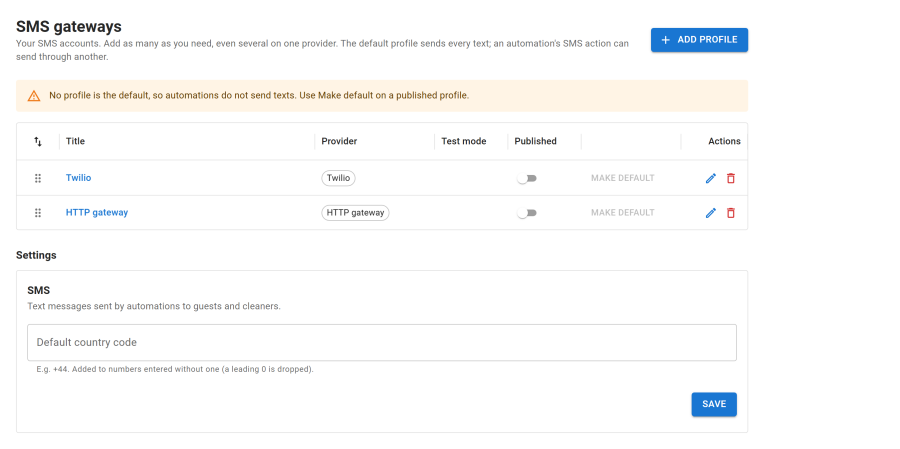
Profiles
Add as many profiles as you need, even several on one provider, with Add profile.
- The default profile sends every text. Use Make default on a published profile. Without a default, automations send no texts and the page says so.
- An automation's SMS action can Send through another profile. A profile that is switched off falls back to the default.
- A profile sends only while it is Published.
Default country code (for example +44) is added to numbers entered without one; a leading 0 is dropped.
Each profile has a Test mode: texts are only written to the Joomla log, with credentials hidden, and counted as sent. Nothing is sent and nothing is charged. Send test SMS sends a test text to a number you type, with the details in the form, saved or not.
Twilio
Enter your Account SID, Auth token and Sender (a Twilio number, a Messaging Service SID or a sender name). See Integrations > Twilio.
HTTP gateway
For any provider that sends a text when you call its address: set the Address, Method, Body format and a Body template with {to}, {text} and {from}, plus an optional API key header and Success text. See Integrations > HTTP SMS gateway for every field and examples.
Switching a gateway off
Each gateway plugin is an app in the App Manager, and needs the SMS app.