iCal sync
Most holiday homes are also listed on Airbnb, Booking.com, Vrbo or a Google Calendar. iCal sync keeps those calendars and yours in step, in both directions, so neither side sells a night the other has booked:
- Import: a channel's calendar is read every 15 minutes and its stays block the nights on your site.
- Export: each property has a private calendar link that the channels read, so your own bookings and blocks close those dates there.
iCal carries dates only. Prices, guest details and booking changes are not exchanged; each side keeps its own bookings. It works with any channel that offers an iCal (.ics) link.
Open Rentals > Calendar sync. The page is there while the iCal sync app is on (Configure > Apps).
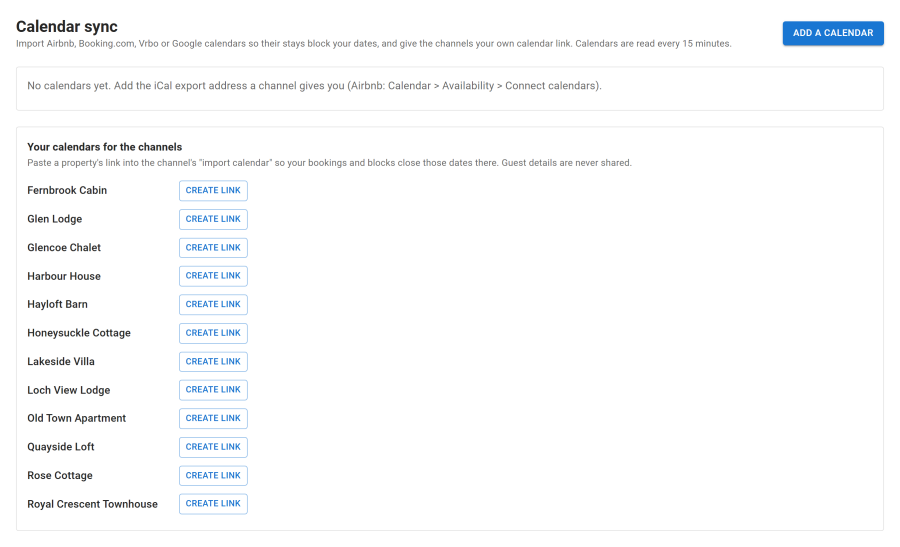
Step by step for each channel:
| Channel | Guide |
|---|---|
| Airbnb | Airbnb |
| Booking.com | Booking.com |
| Vrbo | Vrbo |
| Google Calendar | Google Calendar |
| Other channels | Other iCal channels |
Importing a channel's calendar
- In the channel, copy the property's calendar export address. Each channel has an "export calendar" link per listing; channel menus change from time to time, so look for "export calendar", "sync calendars" or "iCal". Where to find it: see the channel's guide in the table above.
- Under Calendar sync, click Add a calendar for the property.
- Fill in:
| Field | Value |
|---|---|
| Calendar address (iCal / .ics) | The channel's export link. Starts with https:// or webcal:// (webcal:// is read as https://) |
| Name | Shown on the tape chart. Leave empty to use the channel's name |
| Channel | From the address (recognises Airbnb, Booking.com, Vrbo and Google from the link), or choose Airbnb, Booking.com, Vrbo, Google Calendar or Other |
| Block these dates | On by default. While off, this calendar's dates are free on your site |
- Save, then click Read now to read it straight away.
For each calendar the page shows when it was Last read, how many Stays it holds, and the last failure with how many reads in a row failed.
Add one calendar per channel per property. A property listed on Airbnb and Vrbo has two.
Only public addresses are read: an address on a private network is refused (see Limits).
What is imported
- Every event becomes a stay that blocks its nights through the same night ledger as your own bookings, from today up to 730 days ahead.
- An event that gets shorter or disappears frees its nights at the next read.
- Imported stays show on the tape chart with the calendar's name, and the housekeeping schedule plans a clean after them.
- Events your own export link produced are skipped, so a channel that echoes your calendar back cannot block your bookings twice.
The address is stored on your site and hidden in the list; Show reveals it (staff who look are recorded in the audit trail).
Exporting your calendar to the channels
Each property has its own private link under Your calendars for the channels on the Calendar sync page:
- Click Create link for the property. The link is hidden, because anyone with it can read the calendar; click Show, then Copy.
- Paste it into the channel's "import calendar" setting for that listing. The exact menu for each channel is in its guide in the table above.
- The channel now reads your bookings, holds, owner blocks and maintenance and closes those dates.
The link looks like
https://your-site/index.php?option=com_nextselfcatering&task=ical.feed&format=raw&id=12&key=....
What is exported
| On your site | In the export |
|---|---|
| A booking, or a booking still held while the guest pays | Booked |
| An owner block or maintenance | Not available |
| A stay imported from a channel | Not exported, so channels never echo each other's dates |
The export covers from 30 days ago to 730 days ahead. Guest names, emails and prices are never in it.
New link makes a fresh link and stops the old one at once. Use it if the link was shared by mistake, then paste the new link into every channel.
How often calendars are read
- Your site reads the channels: the Sync channel calendars (iCal) scheduled task runs every 15 minutes, and reads each calendar at most every 10 minutes. It asks the channel whether the calendar changed and skips it if not. Read now reads one at once.
- The channels read your site: on their own schedule, often every few hours. Google Calendar can take much longer to refresh a calendar added from a URL.
Because the two sides are not instant, a guest can still book the same nights on two channels within that gap. Keep that in mind for last-minute dates.
Clashes
When an imported stay lands on nights you have already booked or blocked, your booking keeps the nights and the imported stay does not take them. The page lists it under Double bookings to sort out with the property, the channel and the nights. Move or cancel one of the two stays, then click Read now. Once the nights are free, the next read claims them.
Limits
| Limit | Value |
|---|---|
| How far ahead an import blocks | 730 days |
| Largest calendar read | 5 MB |
| Most events in one calendar | 5000 (a larger calendar is refused as an error) |
| Time allowed for a read | 20 seconds |
| Redirects followed | 3 |
| Addresses | http, https or webcal, on the standard ports, on the public internet only |
Addresses on a private network (your own server, a router, a local IP) are refused, so a calendar address can never be used to reach your internal network.
When a calendar fails
While a calendar cannot be read, the dates from its last good read stay blocked, so nothing is sold by mistake. The page shows Failed ... (n in a row) and Last read fine .... Common causes are listed below and in Troubleshooting.
Removing a calendar frees its dates at once.
On a public demo site no calendar is read; imported dates stay as they are.
Troubleshooting
| Symptom | Cause and fix |
|---|---|
| "The calendar answered HTTP 404" (or another code) | The channel no longer serves that link. Copy a fresh export link and edit the calendar |
| "Could not reach the calendar." | The channel was down, or your server cannot make outgoing HTTPS requests. Try Read now later |
| "This calendar address points to a private network and cannot be read." | Use the channel's public iCal link |
| "Reading calendars needs the PHP cURL extension." | Ask your host to enable cURL |
| "The calendar is larger than ... MB." or too many redirects | The link is not a booking calendar. Check you copied the export link, not a web page |
| Calendars are never read | Joomla's scheduled tasks are not running, or the iCal sync app is off |
| The channel does not see your bookings | The property's export link is not pasted in the channel, or the channel has not read it yet. If you used New link, paste the new one |
See also
- Airbnb, Booking.com, Vrbo, Google Calendar and Other iCal channels
- Bookings and tape chart
- Housekeeping: imported stays also get a clean
- Scheduled tasks
- Installation: firewall and outgoing connections