Search and the properties list
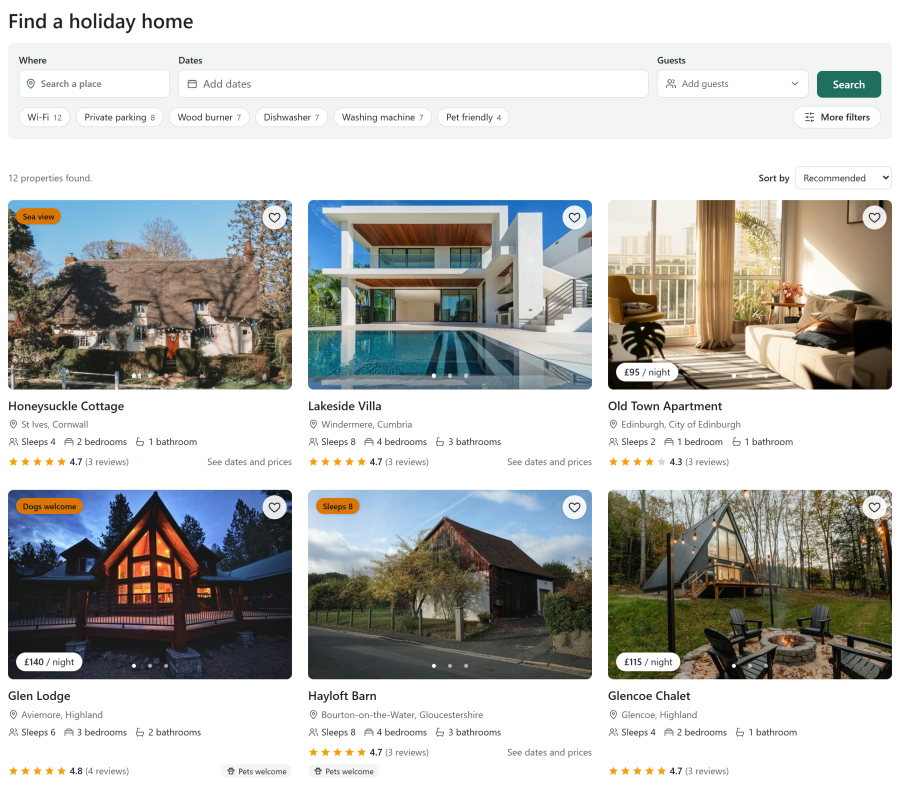
The Properties list menu item lists your properties with a filter, and shows only the ones free for the guest's dates when they give them. Pages are server-rendered HTML that loads fast, works without JavaScript and reads well in search engines. With JavaScript, filtering and paging happen without a reload.
Layouts
Choose the layouts under Configure > Settings > Site layouts, from picture tiles. A Properties list menu item can choose its own; anything it leaves empty comes from Settings.
| Kind | Choices |
|---|---|
| Property card | Classic (photo slider, price, badge, heart), Horizontal, Photo overlay, Minimal |
| Property list | Grid (2, 3 or 4 columns on wide screens), List, Table, Availability calendar |
| Filters | Top bar and filters panel, or Sidebar |
| Pages of results | Page numbers (no reload), Load more button, Load on scroll, Page numbers (page reload) |
Page links are real links, so search engines follow them and the back button works. With Load on scroll, the menu item sets how many pages are added before a Load more button asks first.
Your template can override every layout and add its own, which then show in the pickers. See Template overrides.
The menu item
A Properties list menu item sets:
- Start in location: the location the page shows first. Guests can still pick another
- Results per page (0 uses Configure > Settings > Search and map)
- the Sort menu and the Number of results, shown or hidden
- the Search form, List layout, Property card, Grid columns and Pagination
- which filter groups show, and how many quick amenity chips
- a Colour theme for this page only
Guests sort by featured, price (low to high or high to low), name or bedrooms.
The filter

Top bar and filters panel shows the stay at the top with a More filters panel (a drawer on phones). Sidebar keeps every filter in a column beside the results (behind a Filter button on phones).
| Group | Filters |
|---|---|
| Your stay | Where, arrival and departure, flexible dates, guests and pets |
| The property | A price slider per night or for the whole stay, bedrooms, bathrooms, type of property and guest rating |
| Amenities | A box for each published feature, with how many results have it, plus quick chips for the most common ones |
| Booking | Short breaks offered, arrival day, instant booking or on request, special offers and featured homes |
Each group can be switched off per menu item, or site-wide under Configure > Settings > Site layouts > Filter groups. A hidden group still keeps its values from the address.
The active filters show as chips the guest removes one by one, or all at once. Without JavaScript the filter is a plain form.
The price slider's range comes from the search index, refreshed by the Refresh the search index task.
Flexible dates
Guests can ask for dates up to 1, 2 or 3 days earlier or later. Each property then shows its closest free stay with its price, and its link opens with those dates.
How far ahead
The search looks as far ahead as Days ahead to search under Configure > Settings > Search and map. Many holiday homes change over on set days: a Wednesday-to-Sunday search finds nothing at a Saturday-changeover property.
The map
The map beside the list is the Map module, with the mode Linked to the Properties list on the page: it follows the list's filters, highlights the pin of the card under the pointer, and can search the area in view. See Site modules.
The availability calendar
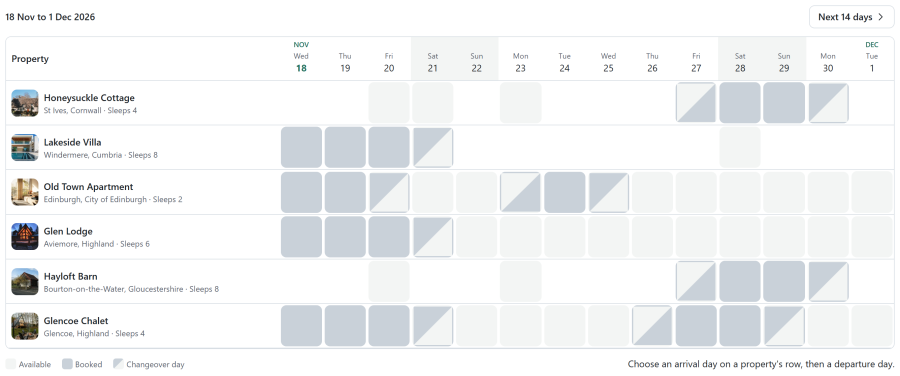
An Availability calendar menu item, or the Availability calendar list layout of the Properties list, shows properties down the side and days across. Each day is split into morning and afternoon, so changeover days show.
- 2, 3 or 4 weeks at a time, with paging without a reload, and an optional location picker
- the guest picks an arrival and a departure on a row: the stay is checked and the property opens with those dates
- as a list layout it follows the filter
- it shows only free or booked, never who booked
Wishlist
- A heart on every card and on the property page. Guests save properties without an account; the list stays in their browser
- After sign-in the browser list joins the account, so it follows the guest to other devices
- A My Wishlist menu item lists the saved properties, and the Wishlist module shows a heart with their number
- Share link: a signed-in guest can share a read-only copy of the list, and stop the link at any time
- Deleting the Joomla account deletes its wishlist
Featured and badges
Featured properties and their badge ("New", "Sea view") show on the cards. Guests can sort by featured and filter featured homes. See Properties.
See also
- Property page
- Site modules
- SEO: landing pages for a location, type or feature
- Menu items and frontend pages