Payment methods
How guests can pay is set under Configure > Payment methods. Three payment plugins come with the package: Stripe, PayPal and Bank transfer. Each plugin can have several methods, for example one Stripe account for each currency.
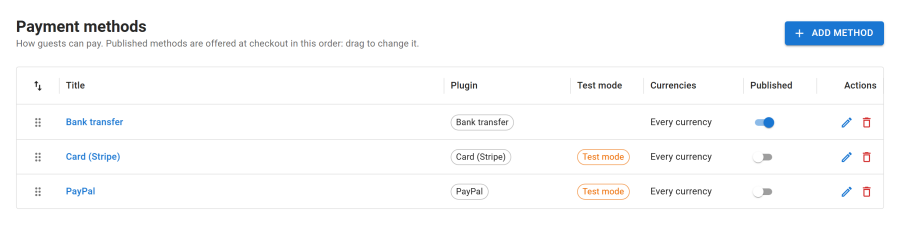
Published methods are offered at checkout in the order of the list: drag them to change it. Without any method, guests can still send enquiries and staff can add bookings by hand.
Adding a method
Click Add method and pick the plugin. The method opens with three tabs:
| Tab | What you set |
|---|---|
| General | Title and Description (shown at checkout, translatable), Published, Currencies (every currency, or only some), Test mode |
| Settings | The plugin's own settings: keys, instructions and options |
| Webhook | The address to register in the provider's dashboard, shown after the first save |
Test mode uses the provider's test account: no real money is taken. Keep it on until a test booking goes through from start to finish. A method in test mode shows a Test mode chip.
Test connection checks the keys of the current mode and lists anything still missing.
Stripe
Card and wallet payments through Stripe, in a form on your booking page or on Stripe's hosted page, with saved cards for the balance, damage deposit card holds, refunds and disputes. The method needs the publishable key, secret key and webhook signing secret of its mode before it is offered.
Set it up step by step, with the webhook events and test cards: see Integrations > Stripe.
PayPal
PayPal Checkout buttons, with Pay Later, cards and Venmo where PayPal offers them, refunds and disputes. No saved cards or card holds. The method needs the client ID, secret and webhook ID of its mode before it is offered.
Set it up step by step, with the webhook events: see Integrations > PayPal.
Bank transfer
Guests book and see your bank details, with {BOOKING} and {AMOUNT} filled in; staff record the money when it arrives. The booking holds its nights for the Bank transfer hold under Configure > Settings > Bookings. The method is not offered while its Instructions are empty.
See Integrations > Bank transfer.
Currencies
A method limited to some currencies is offered only for properties priced in one of them. Stripe and PayPal also accept only the currencies they support.
Switching a plugin off
Each payment plugin is an app in the App Manager. Switched off, its methods are not offered and show an App off chip, but webhooks and refunds of earlier payments still work.