Site modules
The package installs eight site modules. Publish them under Content > Site Modules, in any position of your template. Most modules can use their own Theme preset; see Settings.
| Module | What it shows |
|---|---|
| Search | A search form that opens the Properties list |
| Map | Your properties on a map |
| Properties | A selection of properties as cards |
| Destinations | Location tiles |
| Reviews | The newest guest reviews |
| Availability | A mini calendar of one property |
| Wishlist | A heart with the number of saved properties |
| Currency | The display currency picker |
Search
Where, dates, flexible dates, guests, pets, bedrooms and property type, each of which can be switched off, in three layouts: bar, compact and stacked (chosen in the module's Layout). It opens the Properties list page you choose, or the first Properties list menu item.
Map
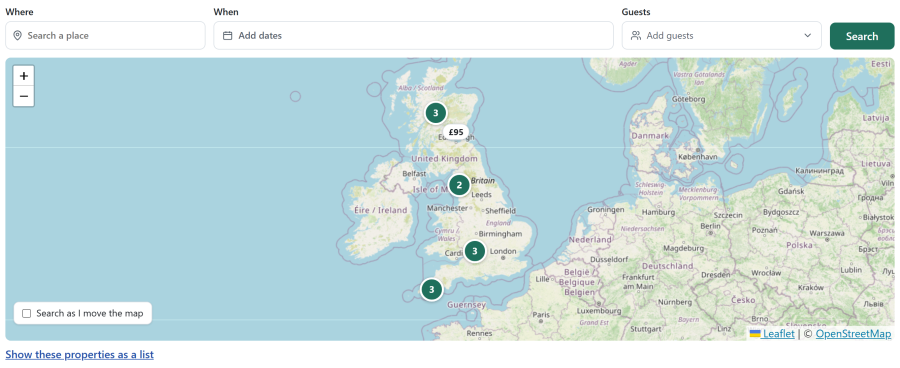
On OpenStreetMap or Google Maps, with Group nearby pins (clusters). Google Maps needs an API key under Configure > Settings > Search and map; until one is set, the site shows OpenStreetMap. Each module can set its own Map provider (As in Settings > Search and map, OpenStreetMap or Google Maps). Group nearby pins (on by default) merges pins close together into a numbered bubble that zooms in when clicked. A property appears only when it has a Latitude and Longitude (the Address tab of the property editor). See OpenStreetMap and Google Maps.
Mode:
- On its own: works on any page, with its own Filter bar (location and flexible dates fields can be switched off). Clicking through opens the Properties list page
- Linked to the Properties list on the page: it follows the list's filters, highlights the pin of the card under the pointer, and can Search the visible area, optionally Search as I move
Set the Height and, for a map on its own, a starting Location.
Properties
Show: featured, latest, in a location, of a type, on offer, recently viewed, similar to the property shown, or hand-picked Properties. Display as a grid, list, carousel or mosaic, with any Card layout, a number of Columns and an optional "See all" link to a menu item.
Destinations
Location tiles, each with a photo and the number of properties in it. Show the locations under a parent, or hand-picked ones, as tiles or a carousel, with a Photo shape and the option to hide locations without properties. Each tile opens the Properties list for that location.
Reviews
The newest published reviews, as a slider or a grid: for chosen properties, or, on a property page, for This property only. Show only reviews rated at or above a number of stars, set how many characters of text show, and link each review to its property.
Availability
A mini calendar of one property for 1 to 3 Months shown, with free, booked and changeover days, the day the week starts on, and a button to the property page (Button text).
Wishlist
A heart with the number of properties the visitor saved, linking to the My Wishlist page. Optionally hidden while the list is empty, with your own Label.
Currency
The display currency picker, shown while the Multi-currency app is on. Display as a Menu (a compact button with the currency sign that opens the list), Chips (every currency side by side) or a Drop-down. See Multilingual content and currencies.
Overriding module layouts
Each module's layout can be overridden in your template under templates/<template>/html/mod_nextselfcatering_<name>/. See Template overrides.